ملف PS1 هو برنامج نصي أو أمر cmdlet ، يستخدمه Windows PowerShell .
سيوضح لك هذا الدليل كيفية إضافة أو إزالة قائمة تحرير أو تشغيل مخصصة إلى قائمة السياق لملفات PowerShell .ps1 لجميع المستخدمين في نظام التشغيل Windows 10 .
تتضمن قائمة "تحرير" أو "تشغيل باستخدام" العناصر التالية لملفات PS1:
- قم بالتشغيل باستخدام PowerShell
- قم بالتشغيل باستخدام PowerShell كمسؤول
- قم بالتشغيل باستخدام PowerShell 7
- قم بالتشغيل باستخدام PowerShell 7 كمسؤول
- قم بالتحرير باستخدام PowerShell ISE
- قم بالتحرير باستخدام PowerShell ISE كمسؤول
- التحرير باستخدام PowerShell ISE (x86)
- قم بالتحرير باستخدام PowerShell ISE (x86) كمسؤول
- تحرير باستخدام المفكرة
- تحرير باستخدام المفكرة كمسؤول
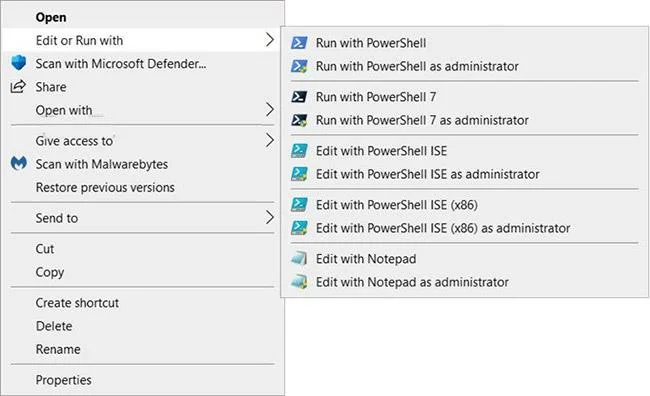
أضف "تحرير أو تشغيل باستخدام" إلى قائمة النقر بزر الماوس الأيمن لملف PS1 في نظام التشغيل Windows 10
كيفية إضافة "تحرير أو تشغيل باستخدام" إلى قائمة النقر بزر الماوس الأيمن لملف PS1 في نظام التشغيل Windows 10
إليك الطريقة:
1. قم بتنفيذ الخطوة 2 (إضافة - النقر بزر الماوس الأيمن)، أو الخطوة 3 (إضافة - Shift + النقر بزر الماوس الأيمن) أو الخطوة 4 (حذف) أدناه اعتمادًا على ما تريد القيام به.
2. لإضافة قائمة سياق ملف PS1 "تحرير أو تشغيل باستخدام" (فقط انقر بزر الماوس الأيمن لعرضها)، قم بتنزيل الملف Add_Edit_or_Run_with_to_PS1_context_menu.reg .
محتويات ملف REG) - الكود:
Windows Registry Editor Version 5.00

[-HKEY_CLASSES_ROOT\.ps1]

[HKEY_CLASSES_ROOT\.ps1]
@="Microsoft.PowerShellScript.1"

[-HKEY_CLASSES_ROOT\Microsoft.PowerShellScript.1]

[HKEY_CLASSES_ROOT\Microsoft.PowerShellScript.1]
"EditFlags"=dword:00020000
"FriendlyTypeName"=hex(2):40,00,22,00,25,00,73,00,79,00,73,00,74,00,65,00,6d,\
  00,72,00,6f,00,6f,00,74,00,25,00,5c,00,73,00,79,00,73,00,74,00,65,00,6d,00,\
  33,00,32,00,5c,00,77,00,69,00,6e,00,64,00,6f,00,77,00,73,00,70,00,6f,00,77,\
  00,65,00,72,00,73,00,68,00,65,00,6c,00,6c,00,5c,00,76,00,31,00,2e,00,30,00,\
  5c,00,70,00,6f,00,77,00,65,00,72,00,73,00,68,00,65,00,6c,00,6c,00,2e,00,65,\
  00,78,00,65,00,22,00,2c,00,2d,00,31,00,30,00,33,00,00,00

[HKEY_CLASSES_ROOT\Microsoft.PowerShellScript.1\DefaultIcon]
@="\"C:\\Windows\\System32\\WindowsPowerShell\\v1.0\\powershell_ise.exe\",1"

[HKEY_CLASSES_ROOT\Microsoft.PowerShellScript.1\Shell]
@="Open"

[HKEY_CLASSES_ROOT\Microsoft.PowerShellScript.1\Shell\Open\Command]
@="\"C:\\Windows\\System32\\notepad.exe\" \"%1\""


[HKEY_CLASSES_ROOT\Microsoft.PowerShellScript.1\Shell\Edit-Run-with]
"MUIVerb"="Edit or Run with"
"Extended"=-
"SubCommands"=""


[HKEY_CLASSES_ROOT\Microsoft.PowerShellScript.1\Shell\Edit-Run-with\shell\001flyout]
"MUIVerb"="Run with PowerShell"
"Icon"="powershell.exe"

[HKEY_CLASSES_ROOT\Microsoft.PowerShellScript.1\Shell\Edit-Run-with\shell\001flyout\Command]
@="\"C:\\Windows\\System32\\WindowsPowerShell\\v1.0\\powershell.exe\" \"-Command\" \"if((Get-ExecutionPolicy ) -ne 'AllSigned') { Set-ExecutionPolicy -Scope Process Bypass }; & '%1'\""


[HKEY_CLASSES_ROOT\Microsoft.PowerShellScript.1\Shell\Edit-Run-with\shell\002flyout]
"MUIVerb"="Run with PowerShell as administrator"
"HasLUAShield"=""
"Icon"="powershell.exe"

[HKEY_CLASSES_ROOT\Microsoft.PowerShellScript.1\Shell\Edit-Run-with\shell\002flyout\Command]
@="\"C:\\Windows\\System32\\WindowsPowerShell\\v1.0\\powershell.exe\" \"-Command\" \"\"& {Start-Process PowerShell.exe -ArgumentList '-ExecutionPolicy RemoteSigned -File \\\"%1\\\"' -Verb RunAs}\""


[HKEY_CLASSES_ROOT\Microsoft.PowerShellScript.1\Shell\Edit-Run-with\shell\003flyout]
"MUIVerb"="Run with PowerShell 7"
"Icon"="pwsh.exe"
"CommandFlags"=dword:00000020

[HKEY_CLASSES_ROOT\Microsoft.PowerShellScript.1\Shell\Edit-Run-with\shell\003flyout\Command]
@="\"C:\\Program Files\\PowerShell\\7\\pwsh.exe\" \"-Command\" \"if((Get-ExecutionPolicy ) -ne 'AllSigned') { Set-ExecutionPolicy -Scope Process Bypass }; & '%1'\""


[HKEY_CLASSES_ROOT\Microsoft.PowerShellScript.1\Shell\Edit-Run-with\shell\004flyout]
"MUIVerb"="Run with PowerShell 7 as administrator"
"HasLUAShield"=""
"Icon"="pwsh.exe"

[HKEY_CLASSES_ROOT\Microsoft.PowerShellScript.1\Shell\Edit-Run-with\shell\004flyout\Command]
@="\"C:\\Program Files\\PowerShell\\7\\pwsh.exe\" \"-Command\" \"\"& {Start-Process pwsh.exe -ArgumentList '-ExecutionPolicy RemoteSigned -File \\\"%1\\\"' -Verb RunAs}\""


[HKEY_CLASSES_ROOT\Microsoft.PowerShellScript.1\Shell\Edit-Run-with\shell\005flyout]
"MUIVerb"="Edit with PowerShell ISE"
"Icon"="powershell_ise.exe"
"CommandFlags"=dword:00000020

[HKEY_CLASSES_ROOT\Microsoft.PowerShellScript.1\Shell\Edit-Run-with\shell\005flyout\Command]
@="\"C:\\Windows\\System32\\WindowsPowerShell\\v1.0\\powershell_ise.exe\" \"%1\""


[HKEY_CLASSES_ROOT\Microsoft.PowerShellScript.1\Shell\Edit-Run-with\shell\006flyout]
"MUIVerb"="Edit with PowerShell ISE as administrator"
"HasLUAShield"=""
"Icon"="powershell_ise.exe"

[HKEY_CLASSES_ROOT\Microsoft.PowerShellScript.1\Shell\Edit-Run-with\shell\006flyout\Command]
@="PowerShell -windowstyle hidden -Command \"Start-Process cmd -ArgumentList '/s,/c,start PowerShell_ISE.exe \"\"%1\"\"'  -Verb RunAs\""


[HKEY_CLASSES_ROOT\Microsoft.PowerShellScript.1\Shell\Edit-Run-with\shell\007flyout]
"MUIVerb"="Edit with PowerShell ISE (x86)"
"Icon"="powershell_ise.exe"
"CommandFlags"=dword:00000020

[HKEY_CLASSES_ROOT\Microsoft.PowerShellScript.1\Shell\Edit-Run-with\shell\007flyout\Command]
@="\"C:\\WINDOWS\\syswow64\\WindowsPowerShell\\v1.0\\powershell_ise.exe\" \"%1\""


[HKEY_CLASSES_ROOT\Microsoft.PowerShellScript.1\Shell\Edit-Run-with\shell\008flyout]
"MUIVerb"="Edit with PowerShell ISE (x86) as administrator"
"HasLUAShield"=""
"Icon"="powershell_ise.exe"

[HKEY_CLASSES_ROOT\Microsoft.PowerShellScript.1\Shell\Edit-Run-with\shell\008flyout\Command]
@="PowerShell -windowstyle hidden -Command \"Start-Process cmd -ArgumentList '/s,/c,start C:\\WINDOWS\\syswow64\\WindowsPowerShell\\v1.0\\powershell_ise.exe \"\"%1\"\"'  -Verb RunAs\""


[HKEY_CLASSES_ROOT\Microsoft.PowerShellScript.1\Shell\Edit-Run-with\shell\009flyout]
"MUIVerb"="Edit with Notepad"
"Icon"="notepad.exe"
"CommandFlags"=dword:00000020

[HKEY_CLASSES_ROOT\Microsoft.PowerShellScript.1\Shell\Edit-Run-with\shell\009flyout\Command]
@="\"C:\\Windows\\System32\\notepad.exe\" \"%1\""


[HKEY_CLASSES_ROOT\Microsoft.PowerShellScript.1\Shell\Edit-Run-with\shell\010flyout]
"MUIVerb"="Edit with Notepad as administrator"
"HasLUAShield"=""
"Icon"="notepad.exe"

[HKEY_CLASSES_ROOT\Microsoft.PowerShellScript.1\Shell\Edit-Run-with\shell\010flyout\Command]
@="PowerShell -windowstyle hidden -Command \"Start-Process cmd -ArgumentList '/s,/c,start C:\\Windows\\System32\\notepad.exe \"\"%1\"\"'  -Verb RunAs\""
3. لإضافة قائمة سياق ملف PS1 "تحرير أو تشغيل باستخدام" (اضغط على Shift + النقر بزر الماوس الأيمن للعرض)، قم بتنزيل الملف Add_Shift + Edit_or_Run_with_to_PS1_context_menu.reg .
محتويات REG - ملف الكود:
Windows Registry Editor Version 5.00

[-HKEY_CLASSES_ROOT\.ps1]

[HKEY_CLASSES_ROOT\.ps1]
@="Microsoft.PowerShellScript.1"

[-HKEY_CLASSES_ROOT\Microsoft.PowerShellScript.1]

[HKEY_CLASSES_ROOT\Microsoft.PowerShellScript.1]
"EditFlags"=dword:00020000
"FriendlyTypeName"=hex(2):40,00,22,00,25,00,73,00,79,00,73,00,74,00,65,00,6d,\
  00,72,00,6f,00,6f,00,74,00,25,00,5c,00,73,00,79,00,73,00,74,00,65,00,6d,00,\
  33,00,32,00,5c,00,77,00,69,00,6e,00,64,00,6f,00,77,00,73,00,70,00,6f,00,77,\
  00,65,00,72,00,73,00,68,00,65,00,6c,00,6c,00,5c,00,76,00,31,00,2e,00,30,00,\
  5c,00,70,00,6f,00,77,00,65,00,72,00,73,00,68,00,65,00,6c,00,6c,00,2e,00,65,\
  00,78,00,65,00,22,00,2c,00,2d,00,31,00,30,00,33,00,00,00

[HKEY_CLASSES_ROOT\Microsoft.PowerShellScript.1\DefaultIcon]
@="\"C:\\Windows\\System32\\WindowsPowerShell\\v1.0\\powershell_ise.exe\",1"

[HKEY_CLASSES_ROOT\Microsoft.PowerShellScript.1\Shell]
@="Open"

[HKEY_CLASSES_ROOT\Microsoft.PowerShellScript.1\Shell\Open\Command]
@="\"C:\\Windows\\System32\\notepad.exe\" \"%1\""


[HKEY_CLASSES_ROOT\Microsoft.PowerShellScript.1\Shell\Edit-Run-with]
"MUIVerb"="Edit or Run with"
"Extended"=""
"SubCommands"=""


[HKEY_CLASSES_ROOT\Microsoft.PowerShellScript.1\Shell\Edit-Run-with\shell\001flyout]
"MUIVerb"="Run with PowerShell"
"Icon"="powershell.exe"

[HKEY_CLASSES_ROOT\Microsoft.PowerShellScript.1\Shell\Edit-Run-with\shell\001flyout\Command]
@="\"C:\\Windows\\System32\\WindowsPowerShell\\v1.0\\powershell.exe\" \"-Command\" \"if((Get-ExecutionPolicy ) -ne 'AllSigned') { Set-ExecutionPolicy -Scope Process Bypass }; & '%1'\""


[HKEY_CLASSES_ROOT\Microsoft.PowerShellScript.1\Shell\Edit-Run-with\shell\002flyout]
"MUIVerb"="Run with PowerShell as administrator"
"HasLUAShield"=""
"Icon"="powershell.exe"

[HKEY_CLASSES_ROOT\Microsoft.PowerShellScript.1\Shell\Edit-Run-with\shell\002flyout\Command]
@="\"C:\\Windows\\System32\\WindowsPowerShell\\v1.0\\powershell.exe\" \"-Command\" \"\"& {Start-Process PowerShell.exe -ArgumentList '-ExecutionPolicy RemoteSigned -File \\\"%1\\\"' -Verb RunAs}\""


[HKEY_CLASSES_ROOT\Microsoft.PowerShellScript.1\Shell\Edit-Run-with\shell\003flyout]
"MUIVerb"="Run with PowerShell 7"
"Icon"="pwsh.exe"
"CommandFlags"=dword:00000020

[HKEY_CLASSES_ROOT\Microsoft.PowerShellScript.1\Shell\Edit-Run-with\shell\003flyout\Command]
@="\"C:\\Program Files\\PowerShell\\7\\pwsh.exe\" \"-Command\" \"if((Get-ExecutionPolicy ) -ne 'AllSigned') { Set-ExecutionPolicy -Scope Process Bypass }; & '%1'\""


[HKEY_CLASSES_ROOT\Microsoft.PowerShellScript.1\Shell\Edit-Run-with\shell\004flyout]
"MUIVerb"="Run with PowerShell 7 as administrator"
"HasLUAShield"=""
"Icon"="pwsh.exe"

[HKEY_CLASSES_ROOT\Microsoft.PowerShellScript.1\Shell\Edit-Run-with\shell\004flyout\Command]
@="\"C:\\Program Files\\PowerShell\\7\\pwsh.exe\" \"-Command\" \"\"& {Start-Process pwsh.exe -ArgumentList '-ExecutionPolicy RemoteSigned -File \\\"%1\\\"' -Verb RunAs}\""


[HKEY_CLASSES_ROOT\Microsoft.PowerShellScript.1\Shell\Edit-Run-with\shell\005flyout]
"MUIVerb"="Edit with PowerShell ISE"
"Icon"="powershell_ise.exe"
"CommandFlags"=dword:00000020

[HKEY_CLASSES_ROOT\Microsoft.PowerShellScript.1\Shell\Edit-Run-with\shell\005flyout\Command]
@="\"C:\\Windows\\System32\\WindowsPowerShell\\v1.0\\powershell_ise.exe\" \"%1\""


[HKEY_CLASSES_ROOT\Microsoft.PowerShellScript.1\Shell\Edit-Run-with\shell\006flyout]
"MUIVerb"="Edit with PowerShell ISE as administrator"
"HasLUAShield"=""
"Icon"="powershell_ise.exe"

[HKEY_CLASSES_ROOT\Microsoft.PowerShellScript.1\Shell\Edit-Run-with\shell\006flyout\Command]
@="PowerShell -windowstyle hidden -Command \"Start-Process cmd -ArgumentList '/s,/c,start PowerShell_ISE.exe \"\"%1\"\"'  -Verb RunAs\""


[HKEY_CLASSES_ROOT\Microsoft.PowerShellScript.1\Shell\Edit-Run-with\shell\007flyout]
"MUIVerb"="Edit with PowerShell ISE (x86)"
"Icon"="powershell_ise.exe"
"CommandFlags"=dword:00000020

[HKEY_CLASSES_ROOT\Microsoft.PowerShellScript.1\Shell\Edit-Run-with\shell\007flyout\Command]
@="\"C:\\WINDOWS\\syswow64\\WindowsPowerShell\\v1.0\\powershell_ise.exe\" \"%1\""


[HKEY_CLASSES_ROOT\Microsoft.PowerShellScript.1\Shell\Edit-Run-with\shell\008flyout]
"MUIVerb"="Edit with PowerShell ISE (x86) as administrator"
"HasLUAShield"=""
"Icon"="powershell_ise.exe"

[HKEY_CLASSES_ROOT\Microsoft.PowerShellScript.1\Shell\Edit-Run-with\shell\008flyout\Command]
@="PowerShell -windowstyle hidden -Command \"Start-Process cmd -ArgumentList '/s,/c,start C:\\WINDOWS\\syswow64\\WindowsPowerShell\\v1.0\\powershell_ise.exe \"\"%1\"\"'  -Verb RunAs\""


[HKEY_CLASSES_ROOT\Microsoft.PowerShellScript.1\Shell\Edit-Run-with\shell\009flyout]
"MUIVerb"="Edit with Notepad"
"Icon"="notepad.exe"
"CommandFlags"=dword:00000020

[HKEY_CLASSES_ROOT\Microsoft.PowerShellScript.1\Shell\Edit-Run-with\shell\009flyout\Command]
@="\"C:\\Windows\\System32\\notepad.exe\" \"%1\""


[HKEY_CLASSES_ROOT\Microsoft.PowerShellScript.1\Shell\Edit-Run-with\shell\010flyout]
"MUIVerb"="Edit with Notepad as administrator"
"HasLUAShield"=""
"Icon"="notepad.exe"

[HKEY_CLASSES_ROOT\Microsoft.PowerShellScript.1\Shell\Edit-Run-with\shell\010flyout\Command]
@="PowerShell -windowstyle hidden -Command \"Start-Process cmd -ArgumentList '/s,/c,start C:\\Windows\\System32\\notepad.exe \"\"%1\"\"'  -Verb RunAs\""
4. لإزالة قائمة سياق ملف PS1 "تحرير أو تشغيل باستخدام"، قم بتنزيل ملف Remove_Edit_or_Run_with_from_PS1_context_menu.reg .
محتويات REG - ملف الكود:
Windows Registry Editor Version 5.00

[-HKEY_CLASSES_ROOT\Microsoft.PowerShellScript.1\Shell\Edit-Run-with]
5. احفظ ملف .reg على سطح المكتب.
6. انقر نقرًا مزدوجًا فوق ملف .reg الذي تم تنزيله لدمجه .
7. عند المطالبة، انقر فوق تشغيل > نعم (UAC) > نعم > موافق للموافقة على الدمج.
8. الآن، يمكنك حذف ملف .reg الذي تم تنزيله إذا أردت ذلك.
أتمنى أن تكون ناجحا.