Fail PS1 ialah skrip atau cmdlet , digunakan oleh Windows PowerShell .
Panduan ini akan menunjukkan kepada anda cara menambah atau mengalih keluar menu Edit atau Jalankan dengan tersuai pada menu konteks untuk fail PowerShell .ps1 untuk semua pengguna dalam Windows 10 .
Menu Edit atau Jalankan dengan konteks termasuk item berikut untuk fail PS1:
- Jalankan dengan PowerShell
- Jalankan dengan PowerShell sebagai pentadbir
- Jalankan dengan PowerShell 7
- Jalankan dengan PowerShell 7 sebagai pentadbir
- Edit dengan PowerShell ISE
- Edit dengan PowerShell ISE sebagai pentadbir
- Edit dengan PowerShell ISE (x86)
- Edit dengan PowerShell ISE (x86) sebagai pentadbir
- Edit dengan Notepad
- Edit dengan Notepad sebagai pentadbir
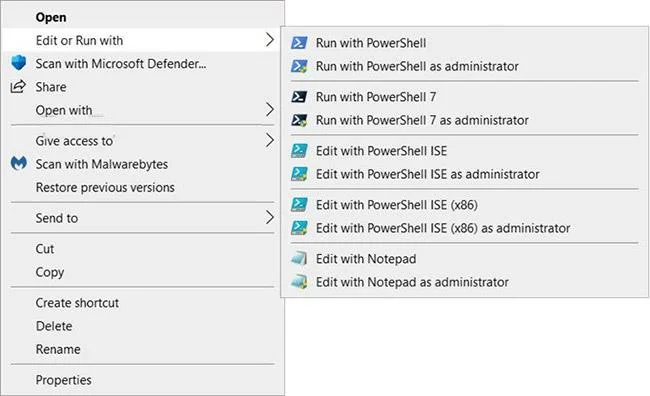
Tambahkan "Edit atau Jalankan dengan" pada menu klik kanan fail PS1 dalam Windows 10
Bagaimana untuk menambah "Edit atau Jalankan dengan" pada menu klik kanan fail PS1 dalam Windows 10
Ini caranya:
1. Lakukan langkah 2 (tambah - klik kanan), langkah 3 (tambah - Shift + klik kanan) atau langkah 4 (padam) di bawah bergantung pada apa yang anda mahu lakukan.
2. Untuk menambah menu konteks fail PS1 "Edit atau Jalankan dengan" (hanya klik kanan untuk memaparkan), muat turun fail Add_Edit_or_Run_with_to_PS1_context_menu.reg .
Kandungan fail REG) - Kod:
Windows Registry Editor Version 5.00

[-HKEY_CLASSES_ROOT\.ps1]

[HKEY_CLASSES_ROOT\.ps1]
@="Microsoft.PowerShellScript.1"

[-HKEY_CLASSES_ROOT\Microsoft.PowerShellScript.1]

[HKEY_CLASSES_ROOT\Microsoft.PowerShellScript.1]
"EditFlags"=dword:00020000
"FriendlyTypeName"=hex(2):40,00,22,00,25,00,73,00,79,00,73,00,74,00,65,00,6d,\
  00,72,00,6f,00,6f,00,74,00,25,00,5c,00,73,00,79,00,73,00,74,00,65,00,6d,00,\
  33,00,32,00,5c,00,77,00,69,00,6e,00,64,00,6f,00,77,00,73,00,70,00,6f,00,77,\
  00,65,00,72,00,73,00,68,00,65,00,6c,00,6c,00,5c,00,76,00,31,00,2e,00,30,00,\
  5c,00,70,00,6f,00,77,00,65,00,72,00,73,00,68,00,65,00,6c,00,6c,00,2e,00,65,\
  00,78,00,65,00,22,00,2c,00,2d,00,31,00,30,00,33,00,00,00

[HKEY_CLASSES_ROOT\Microsoft.PowerShellScript.1\DefaultIcon]
@="\"C:\\Windows\\System32\\WindowsPowerShell\\v1.0\\powershell_ise.exe\",1"

[HKEY_CLASSES_ROOT\Microsoft.PowerShellScript.1\Shell]
@="Open"

[HKEY_CLASSES_ROOT\Microsoft.PowerShellScript.1\Shell\Open\Command]
@="\"C:\\Windows\\System32\\notepad.exe\" \"%1\""


[HKEY_CLASSES_ROOT\Microsoft.PowerShellScript.1\Shell\Edit-Run-with]
"MUIVerb"="Edit or Run with"
"Extended"=-
"SubCommands"=""


[HKEY_CLASSES_ROOT\Microsoft.PowerShellScript.1\Shell\Edit-Run-with\shell\001flyout]
"MUIVerb"="Run with PowerShell"
"Icon"="powershell.exe"

[HKEY_CLASSES_ROOT\Microsoft.PowerShellScript.1\Shell\Edit-Run-with\shell\001flyout\Command]
@="\"C:\\Windows\\System32\\WindowsPowerShell\\v1.0\\powershell.exe\" \"-Command\" \"if((Get-ExecutionPolicy ) -ne 'AllSigned') { Set-ExecutionPolicy -Scope Process Bypass }; & '%1'\""


[HKEY_CLASSES_ROOT\Microsoft.PowerShellScript.1\Shell\Edit-Run-with\shell\002flyout]
"MUIVerb"="Run with PowerShell as administrator"
"HasLUAShield"=""
"Icon"="powershell.exe"

[HKEY_CLASSES_ROOT\Microsoft.PowerShellScript.1\Shell\Edit-Run-with\shell\002flyout\Command]
@="\"C:\\Windows\\System32\\WindowsPowerShell\\v1.0\\powershell.exe\" \"-Command\" \"\"& {Start-Process PowerShell.exe -ArgumentList '-ExecutionPolicy RemoteSigned -File \\\"%1\\\"' -Verb RunAs}\""


[HKEY_CLASSES_ROOT\Microsoft.PowerShellScript.1\Shell\Edit-Run-with\shell\003flyout]
"MUIVerb"="Run with PowerShell 7"
"Icon"="pwsh.exe"
"CommandFlags"=dword:00000020

[HKEY_CLASSES_ROOT\Microsoft.PowerShellScript.1\Shell\Edit-Run-with\shell\003flyout\Command]
@="\"C:\\Program Files\\PowerShell\\7\\pwsh.exe\" \"-Command\" \"if((Get-ExecutionPolicy ) -ne 'AllSigned') { Set-ExecutionPolicy -Scope Process Bypass }; & '%1'\""


[HKEY_CLASSES_ROOT\Microsoft.PowerShellScript.1\Shell\Edit-Run-with\shell\004flyout]
"MUIVerb"="Run with PowerShell 7 as administrator"
"HasLUAShield"=""
"Icon"="pwsh.exe"

[HKEY_CLASSES_ROOT\Microsoft.PowerShellScript.1\Shell\Edit-Run-with\shell\004flyout\Command]
@="\"C:\\Program Files\\PowerShell\\7\\pwsh.exe\" \"-Command\" \"\"& {Start-Process pwsh.exe -ArgumentList '-ExecutionPolicy RemoteSigned -File \\\"%1\\\"' -Verb RunAs}\""


[HKEY_CLASSES_ROOT\Microsoft.PowerShellScript.1\Shell\Edit-Run-with\shell\005flyout]
"MUIVerb"="Edit with PowerShell ISE"
"Icon"="powershell_ise.exe"
"CommandFlags"=dword:00000020

[HKEY_CLASSES_ROOT\Microsoft.PowerShellScript.1\Shell\Edit-Run-with\shell\005flyout\Command]
@="\"C:\\Windows\\System32\\WindowsPowerShell\\v1.0\\powershell_ise.exe\" \"%1\""


[HKEY_CLASSES_ROOT\Microsoft.PowerShellScript.1\Shell\Edit-Run-with\shell\006flyout]
"MUIVerb"="Edit with PowerShell ISE as administrator"
"HasLUAShield"=""
"Icon"="powershell_ise.exe"

[HKEY_CLASSES_ROOT\Microsoft.PowerShellScript.1\Shell\Edit-Run-with\shell\006flyout\Command]
@="PowerShell -windowstyle hidden -Command \"Start-Process cmd -ArgumentList '/s,/c,start PowerShell_ISE.exe \"\"%1\"\"'  -Verb RunAs\""


[HKEY_CLASSES_ROOT\Microsoft.PowerShellScript.1\Shell\Edit-Run-with\shell\007flyout]
"MUIVerb"="Edit with PowerShell ISE (x86)"
"Icon"="powershell_ise.exe"
"CommandFlags"=dword:00000020

[HKEY_CLASSES_ROOT\Microsoft.PowerShellScript.1\Shell\Edit-Run-with\shell\007flyout\Command]
@="\"C:\\WINDOWS\\syswow64\\WindowsPowerShell\\v1.0\\powershell_ise.exe\" \"%1\""


[HKEY_CLASSES_ROOT\Microsoft.PowerShellScript.1\Shell\Edit-Run-with\shell\008flyout]
"MUIVerb"="Edit with PowerShell ISE (x86) as administrator"
"HasLUAShield"=""
"Icon"="powershell_ise.exe"

[HKEY_CLASSES_ROOT\Microsoft.PowerShellScript.1\Shell\Edit-Run-with\shell\008flyout\Command]
@="PowerShell -windowstyle hidden -Command \"Start-Process cmd -ArgumentList '/s,/c,start C:\\WINDOWS\\syswow64\\WindowsPowerShell\\v1.0\\powershell_ise.exe \"\"%1\"\"'  -Verb RunAs\""


[HKEY_CLASSES_ROOT\Microsoft.PowerShellScript.1\Shell\Edit-Run-with\shell\009flyout]
"MUIVerb"="Edit with Notepad"
"Icon"="notepad.exe"
"CommandFlags"=dword:00000020

[HKEY_CLASSES_ROOT\Microsoft.PowerShellScript.1\Shell\Edit-Run-with\shell\009flyout\Command]
@="\"C:\\Windows\\System32\\notepad.exe\" \"%1\""


[HKEY_CLASSES_ROOT\Microsoft.PowerShellScript.1\Shell\Edit-Run-with\shell\010flyout]
"MUIVerb"="Edit with Notepad as administrator"
"HasLUAShield"=""
"Icon"="notepad.exe"

[HKEY_CLASSES_ROOT\Microsoft.PowerShellScript.1\Shell\Edit-Run-with\shell\010flyout\Command]
@="PowerShell -windowstyle hidden -Command \"Start-Process cmd -ArgumentList '/s,/c,start C:\\Windows\\System32\\notepad.exe \"\"%1\"\"'  -Verb RunAs\""
3. Untuk menambah menu konteks fail PS1 "Edit atau Jalankan dengan" (tekan Shift + klik kanan untuk memaparkan), muat turun fail Add_Shift + Edit_or_Run_with_to_PS1_context_menu.reg .
Kandungan REG - Fail kod:
Windows Registry Editor Version 5.00

[-HKEY_CLASSES_ROOT\.ps1]

[HKEY_CLASSES_ROOT\.ps1]
@="Microsoft.PowerShellScript.1"

[-HKEY_CLASSES_ROOT\Microsoft.PowerShellScript.1]

[HKEY_CLASSES_ROOT\Microsoft.PowerShellScript.1]
"EditFlags"=dword:00020000
"FriendlyTypeName"=hex(2):40,00,22,00,25,00,73,00,79,00,73,00,74,00,65,00,6d,\
  00,72,00,6f,00,6f,00,74,00,25,00,5c,00,73,00,79,00,73,00,74,00,65,00,6d,00,\
  33,00,32,00,5c,00,77,00,69,00,6e,00,64,00,6f,00,77,00,73,00,70,00,6f,00,77,\
  00,65,00,72,00,73,00,68,00,65,00,6c,00,6c,00,5c,00,76,00,31,00,2e,00,30,00,\
  5c,00,70,00,6f,00,77,00,65,00,72,00,73,00,68,00,65,00,6c,00,6c,00,2e,00,65,\
  00,78,00,65,00,22,00,2c,00,2d,00,31,00,30,00,33,00,00,00

[HKEY_CLASSES_ROOT\Microsoft.PowerShellScript.1\DefaultIcon]
@="\"C:\\Windows\\System32\\WindowsPowerShell\\v1.0\\powershell_ise.exe\",1"

[HKEY_CLASSES_ROOT\Microsoft.PowerShellScript.1\Shell]
@="Open"

[HKEY_CLASSES_ROOT\Microsoft.PowerShellScript.1\Shell\Open\Command]
@="\"C:\\Windows\\System32\\notepad.exe\" \"%1\""


[HKEY_CLASSES_ROOT\Microsoft.PowerShellScript.1\Shell\Edit-Run-with]
"MUIVerb"="Edit or Run with"
"Extended"=""
"SubCommands"=""


[HKEY_CLASSES_ROOT\Microsoft.PowerShellScript.1\Shell\Edit-Run-with\shell\001flyout]
"MUIVerb"="Run with PowerShell"
"Icon"="powershell.exe"

[HKEY_CLASSES_ROOT\Microsoft.PowerShellScript.1\Shell\Edit-Run-with\shell\001flyout\Command]
@="\"C:\\Windows\\System32\\WindowsPowerShell\\v1.0\\powershell.exe\" \"-Command\" \"if((Get-ExecutionPolicy ) -ne 'AllSigned') { Set-ExecutionPolicy -Scope Process Bypass }; & '%1'\""


[HKEY_CLASSES_ROOT\Microsoft.PowerShellScript.1\Shell\Edit-Run-with\shell\002flyout]
"MUIVerb"="Run with PowerShell as administrator"
"HasLUAShield"=""
"Icon"="powershell.exe"

[HKEY_CLASSES_ROOT\Microsoft.PowerShellScript.1\Shell\Edit-Run-with\shell\002flyout\Command]
@="\"C:\\Windows\\System32\\WindowsPowerShell\\v1.0\\powershell.exe\" \"-Command\" \"\"& {Start-Process PowerShell.exe -ArgumentList '-ExecutionPolicy RemoteSigned -File \\\"%1\\\"' -Verb RunAs}\""


[HKEY_CLASSES_ROOT\Microsoft.PowerShellScript.1\Shell\Edit-Run-with\shell\003flyout]
"MUIVerb"="Run with PowerShell 7"
"Icon"="pwsh.exe"
"CommandFlags"=dword:00000020

[HKEY_CLASSES_ROOT\Microsoft.PowerShellScript.1\Shell\Edit-Run-with\shell\003flyout\Command]
@="\"C:\\Program Files\\PowerShell\\7\\pwsh.exe\" \"-Command\" \"if((Get-ExecutionPolicy ) -ne 'AllSigned') { Set-ExecutionPolicy -Scope Process Bypass }; & '%1'\""


[HKEY_CLASSES_ROOT\Microsoft.PowerShellScript.1\Shell\Edit-Run-with\shell\004flyout]
"MUIVerb"="Run with PowerShell 7 as administrator"
"HasLUAShield"=""
"Icon"="pwsh.exe"

[HKEY_CLASSES_ROOT\Microsoft.PowerShellScript.1\Shell\Edit-Run-with\shell\004flyout\Command]
@="\"C:\\Program Files\\PowerShell\\7\\pwsh.exe\" \"-Command\" \"\"& {Start-Process pwsh.exe -ArgumentList '-ExecutionPolicy RemoteSigned -File \\\"%1\\\"' -Verb RunAs}\""


[HKEY_CLASSES_ROOT\Microsoft.PowerShellScript.1\Shell\Edit-Run-with\shell\005flyout]
"MUIVerb"="Edit with PowerShell ISE"
"Icon"="powershell_ise.exe"
"CommandFlags"=dword:00000020

[HKEY_CLASSES_ROOT\Microsoft.PowerShellScript.1\Shell\Edit-Run-with\shell\005flyout\Command]
@="\"C:\\Windows\\System32\\WindowsPowerShell\\v1.0\\powershell_ise.exe\" \"%1\""


[HKEY_CLASSES_ROOT\Microsoft.PowerShellScript.1\Shell\Edit-Run-with\shell\006flyout]
"MUIVerb"="Edit with PowerShell ISE as administrator"
"HasLUAShield"=""
"Icon"="powershell_ise.exe"

[HKEY_CLASSES_ROOT\Microsoft.PowerShellScript.1\Shell\Edit-Run-with\shell\006flyout\Command]
@="PowerShell -windowstyle hidden -Command \"Start-Process cmd -ArgumentList '/s,/c,start PowerShell_ISE.exe \"\"%1\"\"'  -Verb RunAs\""


[HKEY_CLASSES_ROOT\Microsoft.PowerShellScript.1\Shell\Edit-Run-with\shell\007flyout]
"MUIVerb"="Edit with PowerShell ISE (x86)"
"Icon"="powershell_ise.exe"
"CommandFlags"=dword:00000020

[HKEY_CLASSES_ROOT\Microsoft.PowerShellScript.1\Shell\Edit-Run-with\shell\007flyout\Command]
@="\"C:\\WINDOWS\\syswow64\\WindowsPowerShell\\v1.0\\powershell_ise.exe\" \"%1\""


[HKEY_CLASSES_ROOT\Microsoft.PowerShellScript.1\Shell\Edit-Run-with\shell\008flyout]
"MUIVerb"="Edit with PowerShell ISE (x86) as administrator"
"HasLUAShield"=""
"Icon"="powershell_ise.exe"

[HKEY_CLASSES_ROOT\Microsoft.PowerShellScript.1\Shell\Edit-Run-with\shell\008flyout\Command]
@="PowerShell -windowstyle hidden -Command \"Start-Process cmd -ArgumentList '/s,/c,start C:\\WINDOWS\\syswow64\\WindowsPowerShell\\v1.0\\powershell_ise.exe \"\"%1\"\"'  -Verb RunAs\""


[HKEY_CLASSES_ROOT\Microsoft.PowerShellScript.1\Shell\Edit-Run-with\shell\009flyout]
"MUIVerb"="Edit with Notepad"
"Icon"="notepad.exe"
"CommandFlags"=dword:00000020

[HKEY_CLASSES_ROOT\Microsoft.PowerShellScript.1\Shell\Edit-Run-with\shell\009flyout\Command]
@="\"C:\\Windows\\System32\\notepad.exe\" \"%1\""


[HKEY_CLASSES_ROOT\Microsoft.PowerShellScript.1\Shell\Edit-Run-with\shell\010flyout]
"MUIVerb"="Edit with Notepad as administrator"
"HasLUAShield"=""
"Icon"="notepad.exe"

[HKEY_CLASSES_ROOT\Microsoft.PowerShellScript.1\Shell\Edit-Run-with\shell\010flyout\Command]
@="PowerShell -windowstyle hidden -Command \"Start-Process cmd -ArgumentList '/s,/c,start C:\\Windows\\System32\\notepad.exe \"\"%1\"\"'  -Verb RunAs\""
4. Untuk mengalih keluar menu konteks fail PS1 "Edit atau Jalankan dengan", muat turun fail Remove_Edit_or_Run_with_from_PS1_context_menu.reg .
Kandungan REG - Fail kod:
Windows Registry Editor Version 5.00

[-HKEY_CLASSES_ROOT\Microsoft.PowerShellScript.1\Shell\Edit-Run-with]
5. Simpan fail .reg ke desktop.
6. Klik dua kali fail .reg yang dimuat turun untuk bergabung.
7. Apabila digesa, klik Jalankan > Ya (UAC) > Ya > OK untuk meluluskan gabungan.
8. Sekarang, anda boleh memadam fail .reg yang dimuat turun jika anda mahu.
Semoga anda berjaya.