Un fișier PS1 este un script sau cmdlet , utilizat de Windows PowerShell .
Acest ghid vă va arăta cum să adăugați sau să eliminați un meniu Editare sau Executare cu personalizat în meniul contextual pentru fișierele PowerShell .ps1 pentru toți utilizatorii din Windows 10 .
Meniul Editare sau Executare cu contextual include următoarele elemente pentru fișierele PS1:
- Rulați cu PowerShell
- Rulați cu PowerShell ca administrator
- Rulați cu PowerShell 7
- Rulați cu PowerShell 7 ca administrator
- Editați cu PowerShell ISE
- Editați cu PowerShell ISE ca administrator
- Editați cu PowerShell ISE (x86)
- Editați cu PowerShell ISE (x86) ca administrator
- Editați cu Notepad
- Editați cu Notepad ca administrator
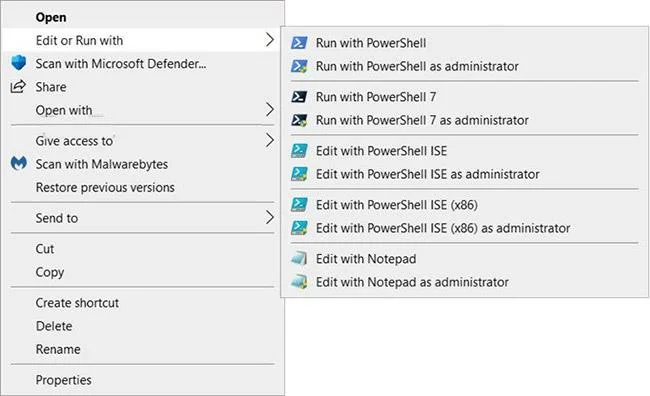
Adăugați „Editați sau Executați cu” în meniul de clic dreapta al fișierului PS1 în Windows 10
Cum să adăugați „Editați sau Executați cu” în meniul de clic dreapta al fișierului PS1 în Windows 10
Iată cum:
1. Efectuați pasul 2 (adăugați - clic dreapta), pasul 3 (adăugați - Shift + clic dreapta) sau pasul 4 (ștergeți) de mai jos, în funcție de ceea ce doriți să faceți.
2. Pentru a adăuga meniul contextual „Editați sau rulați cu” fișierul PS1 (doar faceți clic dreapta pentru a fi afișat), descărcați fișierul Add_Edit_or_Run_with_to_PS1_context_menu.reg .
Conținutul fișierului REG) - Cod:
Windows Registry Editor Version 5.00

[-HKEY_CLASSES_ROOT\.ps1]

[HKEY_CLASSES_ROOT\.ps1]
@="Microsoft.PowerShellScript.1"

[-HKEY_CLASSES_ROOT\Microsoft.PowerShellScript.1]

[HKEY_CLASSES_ROOT\Microsoft.PowerShellScript.1]
"EditFlags"=dword:00020000
"FriendlyTypeName"=hex(2):40,00,22,00,25,00,73,00,79,00,73,00,74,00,65,00,6d,\
  00,72,00,6f,00,6f,00,74,00,25,00,5c,00,73,00,79,00,73,00,74,00,65,00,6d,00,\
  33,00,32,00,5c,00,77,00,69,00,6e,00,64,00,6f,00,77,00,73,00,70,00,6f,00,77,\
  00,65,00,72,00,73,00,68,00,65,00,6c,00,6c,00,5c,00,76,00,31,00,2e,00,30,00,\
  5c,00,70,00,6f,00,77,00,65,00,72,00,73,00,68,00,65,00,6c,00,6c,00,2e,00,65,\
  00,78,00,65,00,22,00,2c,00,2d,00,31,00,30,00,33,00,00,00

[HKEY_CLASSES_ROOT\Microsoft.PowerShellScript.1\DefaultIcon]
@="\"C:\\Windows\\System32\\WindowsPowerShell\\v1.0\\powershell_ise.exe\",1"

[HKEY_CLASSES_ROOT\Microsoft.PowerShellScript.1\Shell]
@="Open"

[HKEY_CLASSES_ROOT\Microsoft.PowerShellScript.1\Shell\Open\Command]
@="\"C:\\Windows\\System32\\notepad.exe\" \"%1\""


[HKEY_CLASSES_ROOT\Microsoft.PowerShellScript.1\Shell\Edit-Run-with]
"MUIVerb"="Edit or Run with"
"Extended"=-
"SubCommands"=""


[HKEY_CLASSES_ROOT\Microsoft.PowerShellScript.1\Shell\Edit-Run-with\shell\001flyout]
"MUIVerb"="Run with PowerShell"
"Icon"="powershell.exe"

[HKEY_CLASSES_ROOT\Microsoft.PowerShellScript.1\Shell\Edit-Run-with\shell\001flyout\Command]
@="\"C:\\Windows\\System32\\WindowsPowerShell\\v1.0\\powershell.exe\" \"-Command\" \"if((Get-ExecutionPolicy ) -ne 'AllSigned') { Set-ExecutionPolicy -Scope Process Bypass }; & '%1'\""


[HKEY_CLASSES_ROOT\Microsoft.PowerShellScript.1\Shell\Edit-Run-with\shell\002flyout]
"MUIVerb"="Run with PowerShell as administrator"
"HasLUAShield"=""
"Icon"="powershell.exe"

[HKEY_CLASSES_ROOT\Microsoft.PowerShellScript.1\Shell\Edit-Run-with\shell\002flyout\Command]
@="\"C:\\Windows\\System32\\WindowsPowerShell\\v1.0\\powershell.exe\" \"-Command\" \"\"& {Start-Process PowerShell.exe -ArgumentList '-ExecutionPolicy RemoteSigned -File \\\"%1\\\"' -Verb RunAs}\""


[HKEY_CLASSES_ROOT\Microsoft.PowerShellScript.1\Shell\Edit-Run-with\shell\003flyout]
"MUIVerb"="Run with PowerShell 7"
"Icon"="pwsh.exe"
"CommandFlags"=dword:00000020

[HKEY_CLASSES_ROOT\Microsoft.PowerShellScript.1\Shell\Edit-Run-with\shell\003flyout\Command]
@="\"C:\\Program Files\\PowerShell\\7\\pwsh.exe\" \"-Command\" \"if((Get-ExecutionPolicy ) -ne 'AllSigned') { Set-ExecutionPolicy -Scope Process Bypass }; & '%1'\""


[HKEY_CLASSES_ROOT\Microsoft.PowerShellScript.1\Shell\Edit-Run-with\shell\004flyout]
"MUIVerb"="Run with PowerShell 7 as administrator"
"HasLUAShield"=""
"Icon"="pwsh.exe"

[HKEY_CLASSES_ROOT\Microsoft.PowerShellScript.1\Shell\Edit-Run-with\shell\004flyout\Command]
@="\"C:\\Program Files\\PowerShell\\7\\pwsh.exe\" \"-Command\" \"\"& {Start-Process pwsh.exe -ArgumentList '-ExecutionPolicy RemoteSigned -File \\\"%1\\\"' -Verb RunAs}\""


[HKEY_CLASSES_ROOT\Microsoft.PowerShellScript.1\Shell\Edit-Run-with\shell\005flyout]
"MUIVerb"="Edit with PowerShell ISE"
"Icon"="powershell_ise.exe"
"CommandFlags"=dword:00000020

[HKEY_CLASSES_ROOT\Microsoft.PowerShellScript.1\Shell\Edit-Run-with\shell\005flyout\Command]
@="\"C:\\Windows\\System32\\WindowsPowerShell\\v1.0\\powershell_ise.exe\" \"%1\""


[HKEY_CLASSES_ROOT\Microsoft.PowerShellScript.1\Shell\Edit-Run-with\shell\006flyout]
"MUIVerb"="Edit with PowerShell ISE as administrator"
"HasLUAShield"=""
"Icon"="powershell_ise.exe"

[HKEY_CLASSES_ROOT\Microsoft.PowerShellScript.1\Shell\Edit-Run-with\shell\006flyout\Command]
@="PowerShell -windowstyle hidden -Command \"Start-Process cmd -ArgumentList '/s,/c,start PowerShell_ISE.exe \"\"%1\"\"'  -Verb RunAs\""


[HKEY_CLASSES_ROOT\Microsoft.PowerShellScript.1\Shell\Edit-Run-with\shell\007flyout]
"MUIVerb"="Edit with PowerShell ISE (x86)"
"Icon"="powershell_ise.exe"
"CommandFlags"=dword:00000020

[HKEY_CLASSES_ROOT\Microsoft.PowerShellScript.1\Shell\Edit-Run-with\shell\007flyout\Command]
@="\"C:\\WINDOWS\\syswow64\\WindowsPowerShell\\v1.0\\powershell_ise.exe\" \"%1\""


[HKEY_CLASSES_ROOT\Microsoft.PowerShellScript.1\Shell\Edit-Run-with\shell\008flyout]
"MUIVerb"="Edit with PowerShell ISE (x86) as administrator"
"HasLUAShield"=""
"Icon"="powershell_ise.exe"

[HKEY_CLASSES_ROOT\Microsoft.PowerShellScript.1\Shell\Edit-Run-with\shell\008flyout\Command]
@="PowerShell -windowstyle hidden -Command \"Start-Process cmd -ArgumentList '/s,/c,start C:\\WINDOWS\\syswow64\\WindowsPowerShell\\v1.0\\powershell_ise.exe \"\"%1\"\"'  -Verb RunAs\""


[HKEY_CLASSES_ROOT\Microsoft.PowerShellScript.1\Shell\Edit-Run-with\shell\009flyout]
"MUIVerb"="Edit with Notepad"
"Icon"="notepad.exe"
"CommandFlags"=dword:00000020

[HKEY_CLASSES_ROOT\Microsoft.PowerShellScript.1\Shell\Edit-Run-with\shell\009flyout\Command]
@="\"C:\\Windows\\System32\\notepad.exe\" \"%1\""


[HKEY_CLASSES_ROOT\Microsoft.PowerShellScript.1\Shell\Edit-Run-with\shell\010flyout]
"MUIVerb"="Edit with Notepad as administrator"
"HasLUAShield"=""
"Icon"="notepad.exe"

[HKEY_CLASSES_ROOT\Microsoft.PowerShellScript.1\Shell\Edit-Run-with\shell\010flyout\Command]
@="PowerShell -windowstyle hidden -Command \"Start-Process cmd -ArgumentList '/s,/c,start C:\\Windows\\System32\\notepad.exe \"\"%1\"\"'  -Verb RunAs\""
3. Pentru a adăuga meniul contextual al fișierului PS1 „Edit or Run with” (apăsați Shift + clic dreapta pentru a afișa), descărcați fișierul Add_Shift + Edit_or_Run_with_to_PS1_context_menu.reg .
Conținutul fișierului REG - Cod:
Windows Registry Editor Version 5.00

[-HKEY_CLASSES_ROOT\.ps1]

[HKEY_CLASSES_ROOT\.ps1]
@="Microsoft.PowerShellScript.1"

[-HKEY_CLASSES_ROOT\Microsoft.PowerShellScript.1]

[HKEY_CLASSES_ROOT\Microsoft.PowerShellScript.1]
"EditFlags"=dword:00020000
"FriendlyTypeName"=hex(2):40,00,22,00,25,00,73,00,79,00,73,00,74,00,65,00,6d,\
  00,72,00,6f,00,6f,00,74,00,25,00,5c,00,73,00,79,00,73,00,74,00,65,00,6d,00,\
  33,00,32,00,5c,00,77,00,69,00,6e,00,64,00,6f,00,77,00,73,00,70,00,6f,00,77,\
  00,65,00,72,00,73,00,68,00,65,00,6c,00,6c,00,5c,00,76,00,31,00,2e,00,30,00,\
  5c,00,70,00,6f,00,77,00,65,00,72,00,73,00,68,00,65,00,6c,00,6c,00,2e,00,65,\
  00,78,00,65,00,22,00,2c,00,2d,00,31,00,30,00,33,00,00,00

[HKEY_CLASSES_ROOT\Microsoft.PowerShellScript.1\DefaultIcon]
@="\"C:\\Windows\\System32\\WindowsPowerShell\\v1.0\\powershell_ise.exe\",1"

[HKEY_CLASSES_ROOT\Microsoft.PowerShellScript.1\Shell]
@="Open"

[HKEY_CLASSES_ROOT\Microsoft.PowerShellScript.1\Shell\Open\Command]
@="\"C:\\Windows\\System32\\notepad.exe\" \"%1\""


[HKEY_CLASSES_ROOT\Microsoft.PowerShellScript.1\Shell\Edit-Run-with]
"MUIVerb"="Edit or Run with"
"Extended"=""
"SubCommands"=""


[HKEY_CLASSES_ROOT\Microsoft.PowerShellScript.1\Shell\Edit-Run-with\shell\001flyout]
"MUIVerb"="Run with PowerShell"
"Icon"="powershell.exe"

[HKEY_CLASSES_ROOT\Microsoft.PowerShellScript.1\Shell\Edit-Run-with\shell\001flyout\Command]
@="\"C:\\Windows\\System32\\WindowsPowerShell\\v1.0\\powershell.exe\" \"-Command\" \"if((Get-ExecutionPolicy ) -ne 'AllSigned') { Set-ExecutionPolicy -Scope Process Bypass }; & '%1'\""


[HKEY_CLASSES_ROOT\Microsoft.PowerShellScript.1\Shell\Edit-Run-with\shell\002flyout]
"MUIVerb"="Run with PowerShell as administrator"
"HasLUAShield"=""
"Icon"="powershell.exe"

[HKEY_CLASSES_ROOT\Microsoft.PowerShellScript.1\Shell\Edit-Run-with\shell\002flyout\Command]
@="\"C:\\Windows\\System32\\WindowsPowerShell\\v1.0\\powershell.exe\" \"-Command\" \"\"& {Start-Process PowerShell.exe -ArgumentList '-ExecutionPolicy RemoteSigned -File \\\"%1\\\"' -Verb RunAs}\""


[HKEY_CLASSES_ROOT\Microsoft.PowerShellScript.1\Shell\Edit-Run-with\shell\003flyout]
"MUIVerb"="Run with PowerShell 7"
"Icon"="pwsh.exe"
"CommandFlags"=dword:00000020

[HKEY_CLASSES_ROOT\Microsoft.PowerShellScript.1\Shell\Edit-Run-with\shell\003flyout\Command]
@="\"C:\\Program Files\\PowerShell\\7\\pwsh.exe\" \"-Command\" \"if((Get-ExecutionPolicy ) -ne 'AllSigned') { Set-ExecutionPolicy -Scope Process Bypass }; & '%1'\""


[HKEY_CLASSES_ROOT\Microsoft.PowerShellScript.1\Shell\Edit-Run-with\shell\004flyout]
"MUIVerb"="Run with PowerShell 7 as administrator"
"HasLUAShield"=""
"Icon"="pwsh.exe"

[HKEY_CLASSES_ROOT\Microsoft.PowerShellScript.1\Shell\Edit-Run-with\shell\004flyout\Command]
@="\"C:\\Program Files\\PowerShell\\7\\pwsh.exe\" \"-Command\" \"\"& {Start-Process pwsh.exe -ArgumentList '-ExecutionPolicy RemoteSigned -File \\\"%1\\\"' -Verb RunAs}\""


[HKEY_CLASSES_ROOT\Microsoft.PowerShellScript.1\Shell\Edit-Run-with\shell\005flyout]
"MUIVerb"="Edit with PowerShell ISE"
"Icon"="powershell_ise.exe"
"CommandFlags"=dword:00000020

[HKEY_CLASSES_ROOT\Microsoft.PowerShellScript.1\Shell\Edit-Run-with\shell\005flyout\Command]
@="\"C:\\Windows\\System32\\WindowsPowerShell\\v1.0\\powershell_ise.exe\" \"%1\""


[HKEY_CLASSES_ROOT\Microsoft.PowerShellScript.1\Shell\Edit-Run-with\shell\006flyout]
"MUIVerb"="Edit with PowerShell ISE as administrator"
"HasLUAShield"=""
"Icon"="powershell_ise.exe"

[HKEY_CLASSES_ROOT\Microsoft.PowerShellScript.1\Shell\Edit-Run-with\shell\006flyout\Command]
@="PowerShell -windowstyle hidden -Command \"Start-Process cmd -ArgumentList '/s,/c,start PowerShell_ISE.exe \"\"%1\"\"'  -Verb RunAs\""


[HKEY_CLASSES_ROOT\Microsoft.PowerShellScript.1\Shell\Edit-Run-with\shell\007flyout]
"MUIVerb"="Edit with PowerShell ISE (x86)"
"Icon"="powershell_ise.exe"
"CommandFlags"=dword:00000020

[HKEY_CLASSES_ROOT\Microsoft.PowerShellScript.1\Shell\Edit-Run-with\shell\007flyout\Command]
@="\"C:\\WINDOWS\\syswow64\\WindowsPowerShell\\v1.0\\powershell_ise.exe\" \"%1\""


[HKEY_CLASSES_ROOT\Microsoft.PowerShellScript.1\Shell\Edit-Run-with\shell\008flyout]
"MUIVerb"="Edit with PowerShell ISE (x86) as administrator"
"HasLUAShield"=""
"Icon"="powershell_ise.exe"

[HKEY_CLASSES_ROOT\Microsoft.PowerShellScript.1\Shell\Edit-Run-with\shell\008flyout\Command]
@="PowerShell -windowstyle hidden -Command \"Start-Process cmd -ArgumentList '/s,/c,start C:\\WINDOWS\\syswow64\\WindowsPowerShell\\v1.0\\powershell_ise.exe \"\"%1\"\"'  -Verb RunAs\""


[HKEY_CLASSES_ROOT\Microsoft.PowerShellScript.1\Shell\Edit-Run-with\shell\009flyout]
"MUIVerb"="Edit with Notepad"
"Icon"="notepad.exe"
"CommandFlags"=dword:00000020

[HKEY_CLASSES_ROOT\Microsoft.PowerShellScript.1\Shell\Edit-Run-with\shell\009flyout\Command]
@="\"C:\\Windows\\System32\\notepad.exe\" \"%1\""


[HKEY_CLASSES_ROOT\Microsoft.PowerShellScript.1\Shell\Edit-Run-with\shell\010flyout]
"MUIVerb"="Edit with Notepad as administrator"
"HasLUAShield"=""
"Icon"="notepad.exe"

[HKEY_CLASSES_ROOT\Microsoft.PowerShellScript.1\Shell\Edit-Run-with\shell\010flyout\Command]
@="PowerShell -windowstyle hidden -Command \"Start-Process cmd -ArgumentList '/s,/c,start C:\\Windows\\System32\\notepad.exe \"\"%1\"\"'  -Verb RunAs\""
4. Pentru a elimina meniul contextual „Editați sau rulați cu” fișierul PS1, descărcați fișierul Remove_Edit_or_Run_with_from_PS1_context_menu.reg .
Conținutul fișierului REG - Cod:
Windows Registry Editor Version 5.00

[-HKEY_CLASSES_ROOT\Microsoft.PowerShellScript.1\Shell\Edit-Run-with]
5. Salvați fișierul .reg pe desktop.
6. Faceți dublu clic pe fișierul .reg descărcat pentru a îmbina.
7. Când vi se solicită, faceți clic pe Executare > Da (UAC) > Da > OK pentru a aproba îmbinarea.
8. Acum, dacă doriți, puteți șterge fișierul .reg descărcat.
Sper că aveți succes.