Birçok kişi IPv6 bağlantısının nasıl test edileceğini merak ediyor. Aşağıdaki makale IPv6 bağlantısını nasıl kontrol edeceğiniz konusunda size yol gösterecektir.
1. Bir tarayıcı kullanın
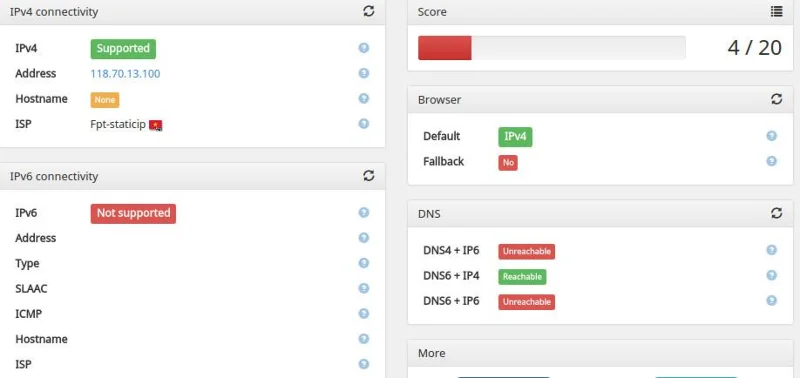
İnternette IPv6 bağlantısını test edebilen birçok site var, işte onlardan biri:
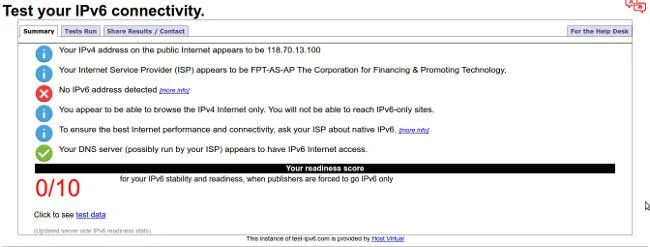
- http://ipv6.he.net/certification/ (Hurricane Electric Free IPv6 Sertifikasyonu)
- http://testmyipv6.com/
- http://whatismyv6.com/
- http://ipv6eyechart.ripe.net/ (RIPE IPv6 Gün bağlantı şeması)
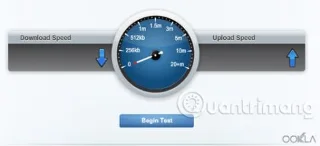
- http://ipv6-test.com/ (IPv4 ve IPv6 hız testi ve Web sitesi testini içerir)

2. “ping”i kullanın
Unix işletim sistemi :
ping6 ipv6.google.com
PING6(56=40+8+8 bayt) 2001:db8:100:603e:e554:e63:3494 --> 2a00:1450:8003::69 2a00:
1450:8003'ten 16 bayt: :69, icmp_seq=0 hlim=55 time=40,915 ms
2a00:1450:8003::69'dan 16 bayt, icmp_seq=1 hlim=55 time=41,042 ms
2a00:1450:8003::69'dan 16 bayt, icmp_seq=2 hlim=55 time=41,695 ms
^C
--- ipv6.l.google.com ping6 istatistikleri ---
3 paket iletilen, 3 paket alınan, %0,0 paket kaybı
gidiş-dönüş min/ortalama/maks/std-dev = 40.915 /41.217/41.695/0.342 ms
Windows işletim sistemi :
C:\Kullanıcılar\örnek>ping ipv6.google.com
32 bayt veriyle ipv6.l.google.com'a [2a00:1450:8003::93] ping atılıyor:
Yanıt 2a00:1450:8003::93: time=41ms
Yanıt 2a00:1450:8003::93: time =39 ms
2a00:1450:8003::93'ten gelen yanıt: süre=40 ms
2a00:1450:8003::93'ten gelen yanıt: süre=42 ms
2a00:1450:8003::93 için ping istatistikleri:
Paketler: Gönderilen = 4, Alınan = 4, Kayıp = 0 (%0 kayıp),
Milisaniye cinsinden yaklaşık gidiş-dönüş süreleri:
Minimum = 39 ms, Maksimum = 42 ms, Ortalama = 40ms
3. Traceroute'u kullanın
Unix işletim sistemi :
# traceroute6 ipv6.google.com
traceroute6'dan ipv6.l.google.com'a (2a00:1450:8003::69) 2001'den:db8:100:603e:e554:e63:3494, maksimum 64 atlama, 12 bayt paket
1 ipv6 .myhome.example.org 2.013 ms 0,489 ms 0,410 ms
2 gw-392.dus-01.de.provider.net 19.032 ms 17.793 ms 18.984 ms
3 sağlayıcı.gateway.example.com 18.508 ms 18.031 ms 17.888 ms
4 2001 :7f8 :8::3b41:0:1 29.801 ms 29.206 ms 28.997 ms
5 2001:4860::1:0:5bd 34.599 ms 29.544 ms
2001:4860::1:0:60d 31.888 ms
6 2001:4860::1: 0:fbc 37,660 ms 41,811 ms
2001:4860::1:0:fdd 37,062 ms
7 2001:4860::1:0:2a 42,040 ms 40,688 ms 40,882 ms
8 2001:4860::2:0:66f 117. 1 20 ms
2001 :4860::2:0:66e 115,167 ms 40,701 ms
9 2001:4860:0:1::2d 42,047 ms 43,176 ms 51,058 ms
10 2a00:1450:8003::69 42,156 ms 41,779 m s 41.387 ms
Windows işletim sistemi :
C:\Kullanıcılar\örnek>tracert ipv6.google.com
Maksimum 30 atlama üzerinden ipv6.l.google.com [2a00:1450:8003::93] rotasını izleme :
1 1 ms 1 ms <1 ms = "" ipv6.myhome.example.org = "">
2 18 ms 18 ms 17 ms gw-392.dus-01.de.provider.net [2001:db8:200:187 ::1]
3 22 ms 17 ms 16 ms sağlayıcı.gateway.example.com [2001:db8:200::1]
4 27 ms 26 ms 30 ms 2001:7f8:8::3b41:0:1
5 34 ms 30 ms 31 ms 2001:4860::1:0:60d
6 33 ms 33 ms 35 ms 2001:4860::1:0:fdd
7 42 ms 41 ms 39 ms 2001:4860::1:0:12
8 40 ms 40 ms 40 ms 2001:4860::2:0:66f
9 41 ms 50 ms 50 ms 2001:4860:0:1::2d
10 45 ms 40 ms 40 ms 2a00:1450:8003::93
Size başarılar diliyorum!