Windows 11 の発売時に、Microsoft は、オペレーティング システムが TPM 2.0 セキュリティ チップを搭載したコンピューターのみをサポートすると発表しました。 Microsoft によると、TMP 2.0 はWindows Hello と BitLoker でセキュリティを提供するための重要なコンポーネントです。これにより、Windows 11 はユーザーの ID とデータをより適切に保護できます。
ユーザーと管理者が TPM に保存されているデータを簡単に制御できるようにするために、Microsoft は TPM Diagnostics と呼ばれるツールを追加しました。これは追加ツールであるため、使用するにはまずインストールする必要があります。
Windows 11 に TPM 診断をインストールして使用するには、次の手順に従ってください。
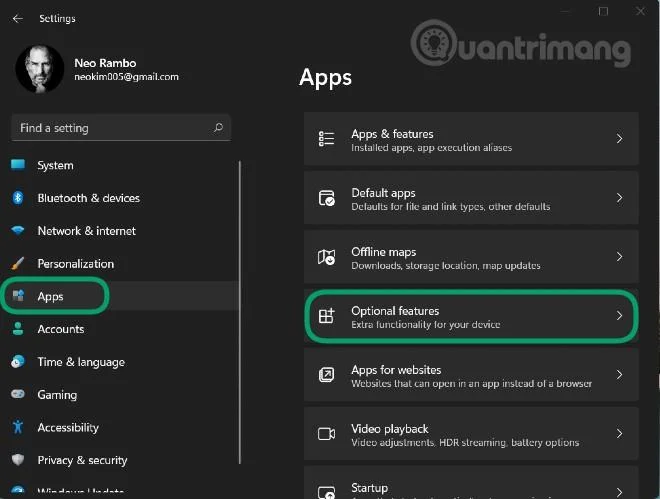
ステップ 1 : Windows + Iを押して設定を開き、左側のバーのアプリセクションにアクセスします
ステップ 2 : [オプション機能]をクリックします。
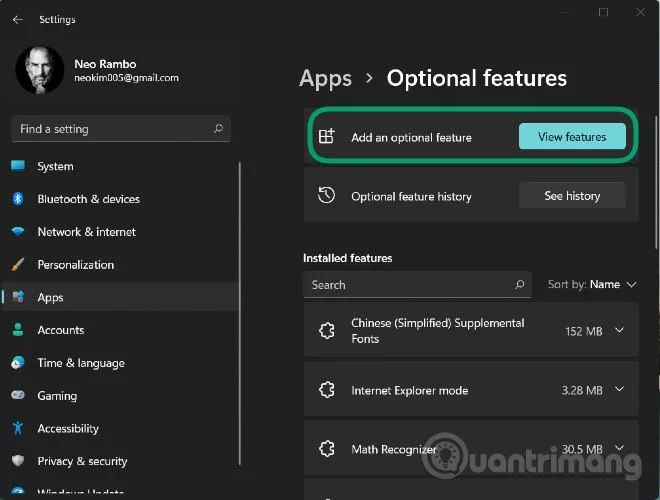
ステップ 3 : [オプション機能の追加]セクションで[機能の表示]をクリックします。
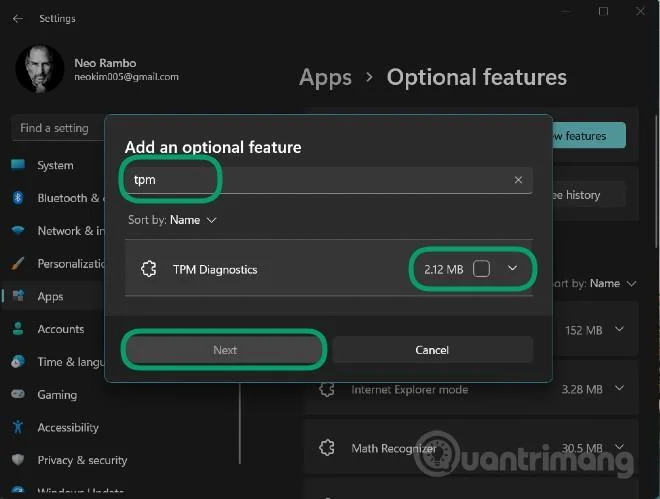
ステップ 4 :検索ボックスに「tpm」と入力し、次に示すTPM 診断ツールの横をクリックし、 [次へ] > [インストール] をクリックしてインストールを確認します。
ステップ 5 : システムがインストールされるのを待った後、Windows ターミナル (管理者) コマンド ウィンドウ (コマンド プロンプトの新しい名前) 経由で TPM 診断を使用できます。
ステップ 6 : Windows + Xを押してパワー ユーザーメニューを開き、[Windows ターミナル (管理者)]を選択します。
ここで、TPM 診断制御コマンドを入力できます。たとえば、TpmDiagnostics.exe GetCapabilitiesコマンドは、以下に示すように、マシン上の TPM チップの機能と設定を一覧表示します。
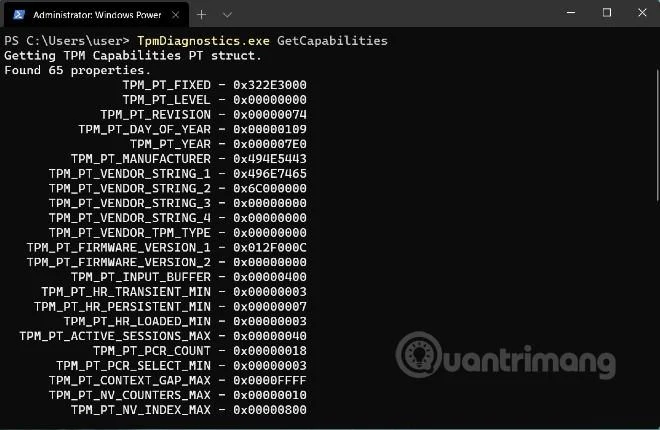
保存されているセキュリティ キーやその他の情報のクエリに加えて、TPM 診断を使用して Base64、16 進数、およびバイナリ ファイルをエンコード/デコードすることもできます。
TPM 診断を使用すると、Windows 11 の基本的なセキュリティ メカニズムについて多くの情報を学ぶことができます。ただし、理解していない場合は、この TPM 診断ツールにあまり「手を出さない」ことをお勧めします。構成が正しくないと、コンピュータの操作に必要なキーを失う可能性があります。
以下は、TPM 診断ツールで使用できるすべてのコマンドのリストです。
Flags:
	PrintHelp ( /h -h )
	PromptOnExit ( -x /x )
	UseECC ( -ecc /ecc )
	UseAes256 ( -aes256 /aes256 )
	QuietPrint ( -q /q )
	PrintVerbosely ( -v /v )

Use the 'help' command to get more information about a command.
Commands:

TpmInfo:
	GetLockoutInfo
	IsOwned
	PlatformType
	CheckFIPS
	ReadClock
	GetDeviceInformation
	IfxRsaKeygenVulnerability
	GatherLogs [full directory path]
	PssPadding
	IsReadyInformation

TpmTask:
	MaintenanceTaskStatus
	ShowTaskStatus
	IsEULAAccepted
	ProvisionTpm [force clear] [allow PPI prompt]

TpmProvisioning:
	PrepareTPM
	CanUseLockoutPolicyClear
	CanClearByPolicy

AutoProvisioning:
	IsAutoProvisioningEnabled
	EnableAutoProvisioning
	DisableAutoProvisioning [-o]

EK:
	EkInfo
	ekchain
	EkCertStoreRegistry
	GetEkCertFromWeb [-ecc] [cert file]
	GetEkCertFromNVR [-ecc] [cert file]
	GetEkCertFromReg [-ecc] [ output file ]
	GetEk [-ecc] [key file]
	CheckEkCertState
	InstallEkCertFromWeb
	InstallEkCertFromNVR
	InstallEkCertThroughCoreProv
	EKCertificateURL

WindowsAIK:
	InstallWindowsAIK [-skipCert]
	WinAikPersistedInTpm
	UninstallWindowsAIKCert
	GetWindowsAIKCert [cert file]
	IsWindowsAIKInstalledInNCrypt
	EnrollWindowsAIKCert
	GetWindowsAIKPlatformClaim ["fresh"] [output file]

OtherKeys:
	PrintPublicInfo [ srk / aik / ek / handle ] [-asBcryptBlob / -RsaKeyBitsOnly / -RsaSymKeyBitsOnly] [-ecc]
	TestParms [ SYMCIPHER | RSA ] [ algorithm specific arguments ]
	EnumerateKeys

NVStorage:
	EnumNVIndexes
	DefineIndex [index] [size] [attribute flags]
	UndefineIndex [index]
	ReadNVIndexPublic [index]
	WriteNVIndex [index] [data in hex format | -file filename]
	ReadNVIndex [index]
	NVSummary

NVBootCounter:
	CheckBootCounter
	ReadBootCounter [/f]

PCRs:
	PrintPcrs

PhysicalPresence:
	GetPPTransition
	GetPPVersionInfo
	GetPPResponse
	GetPPRequest

TPMCommandsAndResponses:
	CommandCode [hex command code]
	ResponseCode [hex response code]

Tracing:
	EnableDriverTracing
	DisableDriverTracing
	FormatTrace [etl file] [output json file]

DRTM:
	DescribeMle [MLE Binary File]

Misc:
	Help [command name]
	DecodeBase64File [file to decode from base 64]
	EncodeToBase64File [file to encode]
	ReadFileAsHex [file to read]
	ConvertBinToHex [file to read] [file to write to]
	ConvertHexToBin [file to read] [file to write to]
	Hash [hex bytes or raw value to hash]
	GetCapabilities