Home
» Tips
»
Free Rental Property Expense & Income Tracker Excel Template: A Beginner-Friendly Setup
Free Rental Property Expense & Income Tracker Excel Template: A Beginner-Friendly Setup
The best rental property tracker for a new landlord uses one transaction table as the source of truth, then separates cash flow from tax treatment. That sounds simple, but it prevents several common mistakes: treating refundable security deposits as rent, treating mortgage principal as a deductible expense, mixing repairs with capital improvements, or putting depreciation into the same list as bank transactions.
You can build this system in Excel without paid property-management software. For one or a handful of rentals, a workbook with five sheets—Properties, Transactions, Categories, Monthly Summary, and Tax Notes—is usually enough to organize income, expenses, documents, and year-end reporting.
This template is for recordkeeping and planning, not personalized tax advice. As of September 11, 2026, the IRS page for Publication 527 identifies the 2025 edition as the current revision and shows no recent developments. The 2025 Schedule E instructions are also the currently published instructions surfaced by the IRS. Use the final forms and instructions for the tax year you actually file. See IRS Publication 527 information and IRS Instructions for Schedule E.
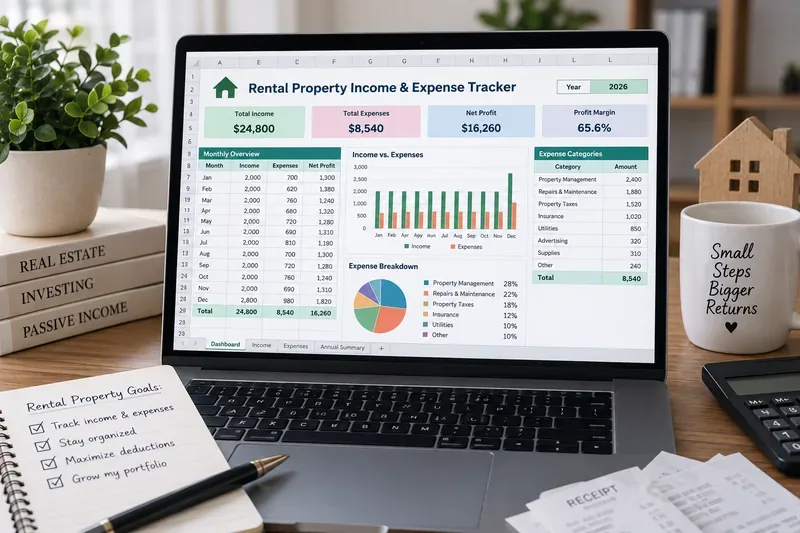
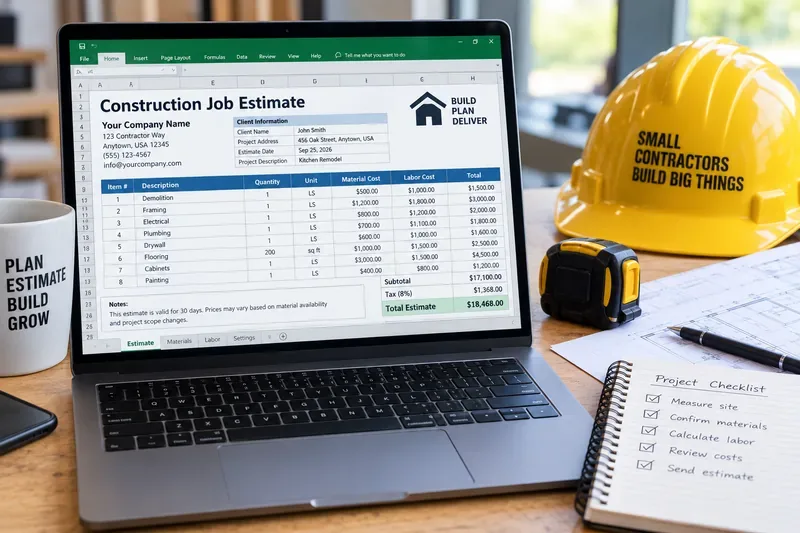
AI-generated illustration of a rental property tracker in an Excel-style workbook; it is not an actual Microsoft Excel or IRS screenshot.
What should you understand before entering the first transaction?
Start with a few terms because they affect how the workbook should be designed.
Rental income
Rental income is generally money, property, or services you receive for the use of real estate. Most ordinary residential rental real-estate income and expenses are reported on Schedule E, although some situations use other forms. For example, the IRS says rental activity involving substantial services for tenant convenience may instead be reported on Schedule C. See IRS Topic No. 414, Rental Income and Expenses.
What to do in the tracker: record each rent payment as an income transaction and identify the property and unit. Keep other income—such as a retained deposit or tenant-paid owner expense—separately categorized so you can review it correctly.
Security deposit
A refundable security deposit is not automatically rent. IRS Publication 527 says not to include a security deposit in income when you receive it if you plan to return it at the end of the lease. If you later keep some or all of it because the tenant did not meet the lease terms, the retained amount is generally included in income in that year. A deposit intended to serve as the final rent payment is advance rent instead.
What to do in the tracker: use a Type such as Security Deposit Liability, not Rental Income, when the deposit is refundable. If part is later retained, enter a separate reclassification or income transaction so the history remains understandable.
Advance rent
Advance rent is rent received before the period it covers. Publication 527 says advance rent is generally included in rental income in the year received, regardless of the period it covers or the accounting method used for this rule.
What to do in the tracker: store both the received date and the rent period. That lets your cash-flow view show when money arrived while preserving the information needed for tax review.
Repair versus improvement
A repair generally keeps property in ordinarily efficient operating condition, while an improvement may need to be capitalized rather than deducted currently. Publication 527 explains that an improvement can involve a betterment, restoration, or adaptation to a new or different use. The IRS specifically tells rental-property owners to separate repair and improvement costs and keep accurate records. See IRS Publication 527.
What to do in the tracker: never classify an ambiguous project as a repair based only on price. Add a Tax Review field and mark uncertain transactions for later review.
Prepare these five Excel sheets
Sheet
Purpose
Why a beginner needs it
Properties
One row per rental property or unit
Keeps addresses, property IDs, ownership notes, and placed-in-service information separate from transactions
Transactions
Every cash receipt and cash payment
Creates one consistent source for summaries and reconciliation
Categories
Controlled list of income, expense, asset, and non-tax categories
Prevents inconsistent labels such as “Repair,” “Repairs,” and “Maintenance/Repair”
Monthly Summary
Income, expenses, and cash flow by month and property
Shows trends without editing the transaction history
Tax Notes
Items requiring tax review, depreciation, personal-use allocation, and supporting notes
Keeps uncertain tax treatment out of the ordinary transaction workflow
Microsoft recommends structured column-based data for analysis, and Excel tables make it easier to filter, expand, and summarize a growing transaction list. See Microsoft Support: Overview of Excel tables.
Build the Properties sheet first
Give every rental a stable Property ID. Do not rely only on an address because addresses can be typed in several ways and units can share the same street address.
Column
Example
Property ID
PROP-001
Property Name
Oak Street Duplex
Address
123 Oak St.
Unit
A
Ownership %
100%
Rental Start Date
2026-01-15
Placed-in-Service Date
2026-01-15
Notes
Long-term residential rental
The placed-in-service date is the date property is ready and available for its intended rental use; it can matter for depreciation. Do not use the purchase date automatically as a substitute if the property was not yet ready for rent.
Create one Transactions table for both income and cash expenses
Convert the transaction range to an Excel table and give it a clear name such as Transactions. A practical layout is:
Column
What it records
Date
Date money was received or paid
Property ID
Property linked to the transaction
Unit
Optional unit identifier
Type
Income, Expense, Security Deposit Liability, Owner Contribution, Owner Draw, Capital Item, or other controlled type
Category
Rent, Advertising, Cleaning, Insurance, Repairs, Utilities, etc.
Payer / Payee
Tenant, vendor, utility, lender, or other party
Description
Plain-language explanation of the transaction
Amount
Positive amount of the receipt or payment
Payment Account
Checking, card, cash, or other account
Document
Receipt filename, invoice number, or cloud-document reference
Cash-Flow Class
Operating, Financing, Capital, Deposit, or Owner
Tax Category
Schedule E-oriented category or review label
Tax Review
Yes / No
Notes
Anything needed to understand the transaction later
Why separate Type, Cash-Flow Class, and Tax Category? Because a transaction can reduce your bank balance without being a currently deductible rental expense. Mortgage principal is the clearest example: it is a real cash outflow, but the principal portion is not the same as deductible mortgage interest. A capital improvement can also consume cash now while being treated differently for tax purposes.
Use drop-down lists instead of typing categories freehand
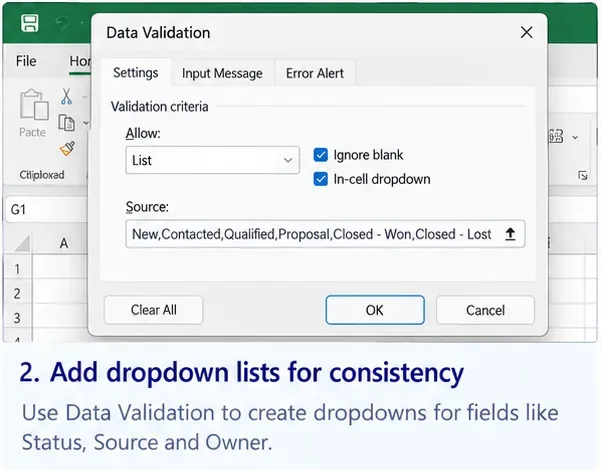
Put approved category names on the Categories sheet, then use Excel Data Validation to create drop-down lists for Property ID, Type, Category, Payment Account, and Tax Review. Microsoft documents Data Validation as a way to restrict cells to allowed values, including list-based drop-downs. See Microsoft Support: Apply data validation to cells.
A starter expense-category list can mirror common Schedule E groupings without pretending that every row is automatically deductible:
Advertising
Auto / Travel Review
Cleaning and Maintenance
Commissions
Insurance
Legal and Professional Fees
Management Fees
Mortgage Interest
Other Interest
Repairs
Supplies
Taxes
Utilities
Capital Improvement Review
Other Expense Review
The IRS says Schedule E is generally used to report income or loss from rental real estate and requires income, expenses, and depreciation to be listed by property. See IRS Schedule E information.
Keep depreciation outside the cash transaction table
Depreciation is a tax deduction that allocates the cost of qualifying property over time. It is not a payment leaving your bank account each month. Publication 527 explains that figuring depreciation can require the property's basis, recovery class and period, convention, placed-in-service date, and depreciation method. Some taxpayers also need Form 4562.
Beginner-safe approach: create a separate section on the Tax Notes sheet with asset description, property ID, date acquired, date placed in service, cost, land allocation if relevant, tax basis, and the depreciation amount supplied by your tax calculation or preparer. Do not create a fake monthly bank transaction called “Depreciation.”
Record repairs and capital improvements separately
Suppose you pay $275 to fix a leaking faucet and $12,000 to replace and substantially upgrade a roof. Both reduce cash, but they should not automatically receive the same tax category. IRS Publication 527 says improvements generally must be capitalized, while repair or maintenance costs may be deductible if they are not required to be capitalized.
A useful transaction workflow is:
Enter the actual payment in Transactions.
Choose Repairs only when classification is reasonably clear.
Choose Capital Improvement Review when the work appears to improve, restore, or adapt the property.
Set Tax Review to Yes for anything uncertain.
Keep the invoice and description of work performed.
This is better than creating an arbitrary dollar rule such as “everything under $1,000 is a repair.” Tax treatment depends on the facts and applicable rules, not merely the invoice amount.
Handle security deposits without inflating rental income
Imagine a tenant pays $2,000 first-month rent plus a $2,000 refundable security deposit. Your bank receives $4,000, but a simple “all deposits equal income” formula would overstate rental income.
Enter two rows:
Type
Category
Amount
Meaning
Income
Rent
$2,000
Rental income
Security Deposit Liability
Refundable Deposit
$2,000
Cash received but not automatically rental income
If $350 is later retained under the lease because of tenant damage, record the event separately and review the proper income and expense treatment. Keeping the original deposit row intact preserves the audit trail.
Build a Monthly Summary with SUMIFS
Excel's SUMIFS function adds values that meet multiple criteria, which makes it well suited to a property-and-month summary. Microsoft documents SUMIFS for multi-condition totals. See Microsoft Support: Sum values based on multiple conditions.
If B2 contains a Property ID, B3 contains the first day of the selected month, and your table is named Transactions, the logic can look like this:
Be precise with labels. If your formula includes mortgage principal, owner draws, or capital purchases, do not call the result “net rental income for tax purposes.” A management cash-flow view and a tax summary answer different questions.
Add a PivotTable when you want faster analysis
A PivotTable is an Excel tool for summarizing a structured data set by fields such as property, month, category, or transaction type. Microsoft recommends column-organized source data with a single header row for PivotTables. See Microsoft Support: Create a PivotTable to analyze worksheet data.
Useful PivotTable views include:
Rental income by property and month
Operating expenses by category and property
Repairs by property
Utilities by month
Capital-item review list
Year-to-date cash flow by property
Do not build the PivotTable directly from manually formatted monthly sheets. Build it from the single Transactions table so the underlying records remain traceable.
Add a mileage sheet if you drive for rental activity
If vehicle mileage is relevant to your rental activity and you are eligible to use the standard mileage method, 2026 requires special attention because the IRS changed the rate during the year. The IRS currently lists the business standard mileage rate as 72.5 cents per mile for January 1 through June 30, 2026, and 76 cents per mile for July 1 through December 31, 2026. See IRS standard mileage rates.
Use columns for:
Date
Property ID
Origin
Destination
Business purpose
Business miles
Applicable rate
Calculated amount
Parking / tolls if separately applicable
Notes
Do not place a single 2026 mileage rate in one fixed workbook cell. Calculate the applicable rate from the trip date or maintain separate first-half and second-half rate tables.
Keep receipts and records linked to the workbook
The spreadsheet is a summary, not the evidence itself. IRS rental-property recordkeeping guidance says you should keep records supporting rental income and expenses, and Schedule E reporting is property-specific. See IRS rental real-estate income, deductions, and recordkeeping guidance.
A simple document structure might be:
2026 / Property-001 / Rent
2026 / Property-001 / Repairs
2026 / Property-001 / Utilities
2026 / Property-001 / Insurance
2026 / Property-001 / Capital Projects
2026 / Property-001 / Tax Documents
Name files so they can be matched to a transaction, for example 2026-08-17_Plumber_275-00_INV1042.pdf. Then put the filename or document reference in the Transaction row.
Reconcile the tracker every month
Reconciliation means comparing your tracker with bank, credit-card, payment-platform, and property-management statements to find missing, duplicated, or incorrectly categorized transactions.
A simple month-end routine is:
Confirm all rent and other receipts are entered.
Compare expense rows with bank and card statements.
Check deposits so refundable security deposits are not counted as ordinary rent.
Separate mortgage interest from principal using the lender statement.
Review any transaction marked Tax Review = Yes.
Attach or locate missing receipts and invoices.
Refresh the Monthly Summary or PivotTable.
Monthly review is much easier than trying to reconstruct twelve months of rental activity shortly before filing a return.
Common mistakes to avoid
Counting every bank deposit as rent
Owner contributions, refundable security deposits, loan proceeds, and transfers between your own accounts can increase a bank balance without being ordinary rental income.
Better: classify the transaction before it reaches the income summary.
Deducting the entire mortgage payment as an expense
A mortgage payment can contain principal, interest, and escrow components. Schedule E separately addresses deductible mortgage interest; principal repayment is not the same item.
Better: split the payment using the lender statement instead of entering one “Mortgage Expense” row for the full amount.
Automatically treating every contractor invoice as a repair
A large project may be an improvement that must be capitalized, while some maintenance may be deductible under applicable rules.
Better: use a review category and preserve the invoice description.
Mixing personal and rental use without a flag
If a dwelling is also used personally, allocation rules can apply. Schedule E instructions require reporting fair-rental and personal-use days for relevant property, and Publication 527 discusses how personal use can affect deductions.
Better: add personal-use days and rental-use days to the property or tax-notes section when this applies.
Using the spreadsheet as the only tax record
A row saying “Roof repair $12,000” does not show what work was done, who performed it, or whether the cost was an improvement.
Better: retain contracts, receipts, invoices, settlement records, and other supporting documents.
When is Excel enough—and when should you upgrade?
Your situation
Excel is usually reasonable when
Consider accounting/property software when
One rental
Transaction volume is modest and you reconcile monthly
You need automated rent collection, tenant portals, or maintenance workflows
Several rentals
Every transaction has a Property ID and your categories stay consistent
Bank feeds and property-level reconciliation are taking too much manual time
Short-term or service-heavy rental
You only need management tracking
Your tax reporting may differ from ordinary Schedule E treatment and professional accounting support becomes more valuable
Growing portfolio
You can still trace every summary number back to a transaction and document
Multiple entities, partners, loans, employees, or complex capital projects make the workbook fragile
Beginner setup checklist
Create one stable Property ID for each rental or unit.
Use one Excel table for all cash transactions.
Separate cash-flow classification from tax classification.
Use Data Validation drop-downs for property IDs and categories.
Track refundable security deposits separately from rent.
Record advance rent with both received date and rental period.
Separate mortgage principal from interest.
Flag repair-versus-improvement questions for review.
Keep depreciation on a separate tax/asset schedule, not as a fake cash payment.
Store receipt or invoice references in every important expense row.
Use SUMIFS or a PivotTable for property and monthly summaries.
For 2026 mileage, apply the correct rate based on the trip date.
Reconcile the workbook with financial statements every month.
A rental property expense and income tracker works best when it does less guessing and preserves more evidence. Record the transaction once, identify the property, classify what actually happened to the cash, then keep tax treatment as a separate field that can be reviewed. That structure gives a new landlord a useful monthly dashboard without making the dangerous assumption that every cash inflow is taxable rent or every cash outflow is an immediate deduction.