Home
» Tips
»
Simple Printable Daycare Attendance Sheet for Home Childcare: What to Track and Why
Simple Printable Daycare Attendance Sheet for Home Childcare: What to Track and Why
A simple daycare attendance sheet should answer one question immediately: which children are in your care right now, and when did each child arrive or leave? For most home childcare programs, a one-page daily form is the easiest format to maintain. At minimum, it should include the date, each child’s name, actual arrival time, actual departure time, and a place for a parent or guardian initial or signature when your rules or payment program requires one.
The form does not need to be complicated. In fact, extra fields can make a paper attendance log harder to use during a busy drop-off period. The best printable template is the one you can complete consistently, review quickly, and store in a way that matches your licensing, subsidy, insurance, or food-program requirements.
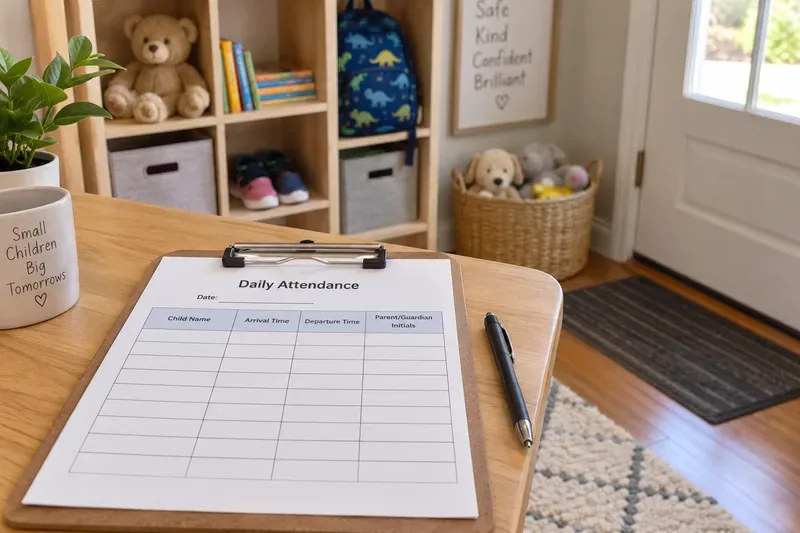
A one-page daily attendance log at the entryway makes arrival and departure recording easy to complete as families come and go.
What should a simple daycare attendance sheet include?
Start with the smallest set of fields that lets you reconstruct the day accurately. For a home daycare, the following layout is usually practical:
Field
Why it matters
When it may be optional
Program or provider name
Identifies the record if pages are separated from the binder.
Usually optional if every page is stored in one clearly labeled program file.
Date
Connects every entry to a specific operating day.
Do not omit it.
Child name
Shows exactly who was scheduled and/or present.
Use the level of identification permitted by your rules and privacy practices.
Arrival time
Records when care actually began.
Do not replace it with the scheduled time if actual times are required.
Departure time
Records when the child actually left care.
Do not omit it for children who attended.
Parent/guardian initials or signature
Can document who confirmed drop-off or pickup.
Include it when required by licensing, a subsidy program, your contract, or your own operating policy.
Attendance status or note
Explains an absence, early pickup, school-day schedule, or other unusual situation.
Optional if your other records already capture this information and no rule requires it.
Keep health information, medication details, incident reports, and sensitive family notes on their proper confidential forms rather than turning the attendance sheet into a general case record. Attendance should stay fast to read.
Do you need a daily sheet or a weekly sheet?
For a small home childcare program, a daily attendance sheet is usually the cleaner choice. One page represents one day, so it is easy to see who is present without scanning across a full week. It also reduces the chance of entering an arrival or departure time in the wrong date column.
A weekly sheet can save paper when the same small group attends on predictable schedules, but it becomes crowded quickly if you track actual arrival and departure times, initials, school transportation, part-time schedules, or notes. If you are choosing between the two, use a daily page when real-time accountability matters more than compact filing. Use a weekly page only when your licensing and reimbursement rules allow it and the layout remains readable.
Is a printable attendance sheet enough for licensing?
Not by itself. A printable form is a recordkeeping tool, not a universal compliance form. In the United States, state and territory governments set child care licensing requirements, and additional requirements vary by location and type of care. Childcare.gov specifically notes that licensing requirements differ across states and territories. Review the official Childcare.gov explanation of child care licensing and then follow the link for your own state or territory before deciding which fields or retention period are sufficient.
A concrete example shows why this matters. Texas Minimum Standards for Child-Care Homes, revised August 19, 2024, state in Section 747.635 that a child-care home must maintain an attendance record for each child and may use a sign-in/sign-out log or another attendance chart. The same section says those attendance records must be kept for the previous three months and made available to Licensing upon request. See the official Texas HHS Minimum Standards for Child-Care Homes. That is a Texas example, not a nationwide retention rule.
If you receive child care subsidy payments, participate in another government program, or operate under a local contract, check those requirements too. A payer may require information beyond what your licensing agency requires.
Printable daycare attendance sheet template
The template below is intentionally simple. Print one copy per operating day, or recreate the same columns in a word processor or spreadsheet. Add or remove the initials and notes columns only after confirming what your program needs.
Provider check at end of day: All children who arrived have a recorded departure time: Yes / No
Provider initials: ____________________
Should you record scheduled times or actual arrival and pickup times?
Record actual times when your purpose is attendance tracking. A schedule tells you when a child was expected. An attendance log tells you what actually happened.
For example, if Maya is scheduled from 8:00 a.m. to 4:30 p.m. but arrives at 8:17 a.m. and leaves at 4:42 p.m., the attendance sheet should normally show 8:17 a.m. and 4:42 p.m. That difference may matter for supervision records, billing, subsidy documentation, or simply resolving a later question from a family.
Choose one time format and keep it consistent. If you use a 12-hour clock, write a.m. and p.m. clearly. If you prefer a 24-hour clock, use it on every row. Consistency is more important than the format itself unless your regulator or payment program specifies a format.
What should you do with absences, late arrivals, and unusual pickups?
Do not create a complicated code system unless you genuinely need one. Short, plain entries are easier to understand months later. Examples include “Absent,” “School until 2:30,” “Early pickup,” or “Parent notified.” If a different authorized adult picks up the child, use the separate pickup authorization process required by your program; the attendance sheet should not replace identity verification or authorization records.
For a child who never arrives, leave the arrival and departure fields blank and mark the attendance status as “Absent” if your system uses an absence field. Avoid entering “0:00,” dashes that could be mistaken for missing data, or estimated times later in the day.
How long should you keep daycare attendance sheets?
There is no single U.S. retention period that fits every home childcare provider. Your state or territory, licensing category, subsidy contract, tax or accounting needs, food program, insurer, or local agency may impose different rules. The safest approach is to identify the rule that applies to your specific program and write the retention period into your recordkeeping policy.
The Texas example above requires the previous three months of child-care-home attendance records to be retained for Licensing review. Do not copy that number into another state’s policy without checking your own authority. If you cannot confirm the applicable period, contact your licensing office or administering agency rather than relying on a generic template website.
How can a home daycare avoid common attendance errors?
Do not pre-fill actual arrival or departure times. Enter the time when the event occurs.
Do not let the date disappear. A page without a date can become useless once removed from its binder.
Check for open rows before closing. If a child has an arrival time but no departure time, resolve it the same day while the event is fresh.
Make corrections readable. Follow your licensing or program rules for corrections rather than erasing information in a way that hides the original entry.
Protect family privacy. Keep the clipboard where authorized adults can sign without freely browsing other families’ records. Use only the identifying information your rules and operations require.
Separate attendance from sensitive notes. Medical, behavioral, incident, custody, and payment details often belong in more restricted records.
When is paper better than a digital attendance system?
Paper works well when you have a small enrollment, one main entrance, a single provider or small team, and you want a low-cost system that remains usable during an internet or device outage. A clipboard by the entryway can be faster than unlocking a phone or tablet during a busy handoff.
Digital attendance becomes more useful when you need automatic timestamps, multiple staff members, more than one location, parent notifications, payroll integration, detailed billing, or frequent reporting. Even then, confirm that the digital system can produce the records your regulator or payer expects. A polished app is not automatically compliant simply because it tracks check-ins.
Quick setup checklist for a home childcare attendance station
Print enough daily sheets for the week and pre-fill only the provider name and dates.
Place the sheet at the normal drop-off and pickup point with a working pen.
Record actual arrival and departure times immediately.
Use initials or signatures only in the way your rules, contracts, and privacy practices allow.
At closing, verify every child who arrived also has a departure entry.
File completed pages in date order and retain them for the period required by your applicable authority or program.
A simple attendance sheet is valuable because it creates a reliable daily record without adding unnecessary work. Keep the form readable, record what actually happened, review it before the end of each day, and treat the template as a starting point that must be matched to your local child care requirements. For a home provider, that combination is usually more useful than a feature-heavy form that is difficult to complete consistently.