Home
» Tips
»
HubSpot Free CRM vs. Zoho CRM: Best Choice for Solo Real Estate Agents in 2026
HubSpot Free CRM vs. Zoho CRM: Best Choice for Solo Real Estate Agents in 2026
Short answer: HubSpot Free CRM is the better default for most solo real estate agents who want a clean contact database, one straightforward deal pipeline, built-in meeting scheduling, email engagement tools, and an easy path from lead to appointment. Zoho CRM Free is the stronger choice when you care more about no-cost workflow automation, webforms, a lead-centric sales process, or having up to three users. The biggest tradeoff for real estate is customization: HubSpot documents custom properties across its plans, while Zoho states that custom fields are not available in its Free edition.
This comparison was checked against official HubSpot and Zoho documentation on September 11, 2026. Free-plan limits can change, so verify the vendor pages before building a long-term workflow around a specific quota.
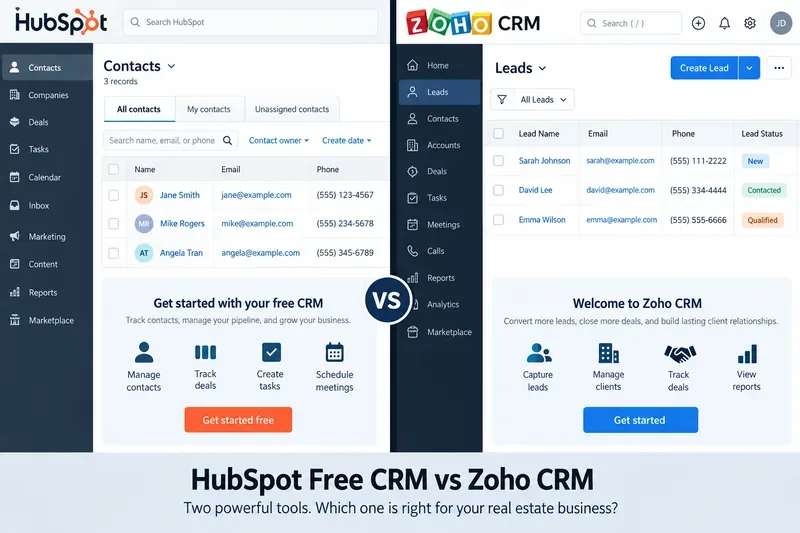
A side-by-side conceptual view of the two CRM approaches: HubSpot emphasizes contact and deal management, while Zoho emphasizes lead tracking and sales-process tools.
HubSpot vs. Zoho for a Solo Agent: The Decision in One Table
Decision factor
HubSpot Free CRM
Zoho CRM Free
Better fit for a solo agent
Free users
Up to 2 users
Up to 3 users
Zoho if you want an assistant or partner in the same free account
Core sales records
Contacts, companies, deals, tasks
Leads, contacts, accounts, deals, tasks and events
Tie; Zoho is more explicitly lead-centric
Pipeline
1 deal pipeline on Free
Basic deal tracking on Free
HubSpot for a simple buyer/seller transaction pipeline
Meeting scheduling
1 personal meeting link on Free
Calendar booking is not listed as a Free feature in Zoho's current edition guidance
HubSpot
Workflow automation
Free tier is limited; broader sales automation is paid
Zoho's current Free guide advertises five workflow automation rules
Zoho
Custom fields/properties
HubSpot documents custom properties for all plans, subject to plan limits
Zoho says custom fields are not available in Free
HubSpot for real-estate-specific data
Web lead capture
Forms and free marketing tools are available, with free-tier limits
Free guide advertises webforms
Either, depending on the website workflow
Best overall use
Simple, client-focused CRM with appointment and communication tools
More process-oriented free CRM with automation
HubSpot for most solo agents; Zoho for automation-first users
Why HubSpot Free CRM Is the Better Default for Most Solo Real Estate Agents
A solo agent usually does not need a complex sales system. The practical requirement is to stop leads from disappearing between an open house, a text message, a portal inquiry, a showing, and a follow-up call. HubSpot's Free CRM maps well to that problem.
According to HubSpot's official Free CRM page, the free product includes contact management, deal pipelines, CRM import, and reporting. HubSpot currently says the free tier supports up to two users and 1,000 contacts with no expiration date. Its Sales Hub pricing page also lists one deal pipeline and one personal meeting-scheduling link on the Free tier.
That combination is useful for a solo real estate workflow because you can keep the operating model very small. A buyer can be a contact, the active home search can be a deal, and the stages can represent your actual next steps: New Inquiry, Qualified, Showing Scheduled, Offer Preparation, Under Contract, Closed, and Nurture. You do not need several pipelines until your business becomes more specialized.
Example: a buyer lead from an open house
Suppose Jordan visits a Sunday open house and says the budget is $650,000, the preferred area is north of downtown, and the move date is within four months. In HubSpot, you can create the contact, log the conversation, associate a deal, schedule the next appointment, and add relevant property data. HubSpot's official properties documentation says custom properties are available across products and plans, although the number you can create depends on the subscription.
For a real estate agent, those properties matter. Instead of burying key information in notes, you can create structured fields such as Buyer or Seller, Target Neighborhood, Budget Range, Financing Status, Property Type, Target Move Date, and Lead Source. That makes the CRM more useful when you return to a lead weeks later.
HubSpot's free limits you are likely to notice
The free plan is generous enough to validate a CRM habit, but it is intentionally limited. HubSpot's current pricing pages list a maximum of two free users, one deal pipeline, three email templates, three canned snippets, and one personal meeting link. Free marketing email also carries HubSpot branding. Those limits are usually acceptable for one agent, but they matter if you add a transaction coordinator, buyer's agent, ISA, or marketing assistant.
When Zoho CRM Free Is the Better Choice
Zoho deserves serious consideration when your main problem is not scheduling or contact organization but repeatable process execution. Its Free edition is designed more like a traditional sales CRM, with separate Leads, Contacts, Accounts, and Deals modules.
Zoho's current edition guide, last updated May 5, 2026, says the Free edition supports basic lead, contact, and deal tracking and limited workflow automation. Zoho's Free Edition guide advertises three free users, five workflow automation rules, webforms, reports, a mobile app, and 150 emails per day.
For a solo agent, five workflow rules can be more valuable than they sound. You might automatically create a follow-up task when a new web lead arrives, send yourself a reminder after a period of inactivity, or trigger an acknowledgment email after a prospect submits a form. That can help when your business has enough inbound activity that manual follow-up is becoming unreliable.
Example: a website lead funnel
Imagine you run neighborhood landing pages that collect seller inquiries. Your priority is to capture every form submission, label it as a new lead, and make sure a follow-up action happens immediately. Zoho's Free edition can be attractive because its official free-tier materials specifically promote webforms and workflow automation.
However, there is an important real-estate-specific limitation. Zoho's custom-field documentation says custom fields are not available in the Free edition. If your CRM design depends on fields such as MLS ID, listing status, bedrooms, desired school district, pre-approval amount, seller motivation, or closing target date, you may outgrow Zoho Free faster than expected.
Which CRM Handles Real Estate Data Better?
For a solo agent, the answer depends on whether you want to model people and relationships or a more formal sales process.
HubSpot is easier to recommend when your database centers on people: buyers, sellers, referral partners, lenders, attorneys, inspectors, and past clients. A contact-first model plus custom properties is flexible enough to capture the details that matter without forcing you into a heavy CRM structure.
Zoho is attractive when you think in explicit stages: raw lead, qualified prospect, active opportunity, and closed deal. Its separate modules and automation capabilities fit that structure well. But if you need detailed custom real estate fields on the free plan, Zoho's documented limitation is meaningful.
What About Email, Follow-Up, and Appointment Booking?
For a solo agent who wins business through fast responses and appointments, HubSpot has the clearer free advantage. Its official CRM materials include email tracking and engagement notifications, templates, scheduling, document sharing, and meeting scheduling. The free Sales Hub pricing page currently caps meeting scheduling at one personal link, which is usually enough for one agent.
Zoho Free includes email-related functionality and workflow-triggered actions, but its free-plan strength is more about CRM process than a polished appointment-booking flow. Zoho's own downgrade documentation lists calendar booking among features you lose when moving from Standard to Free, so you should not choose Zoho Free expecting the same booking experience as its paid editions.
Which One Is Easier to Start With?
HubSpot is usually the faster start if your goal is “replace my spreadsheet this afternoon.” Import contacts, create a few deal stages, connect your email, create one meeting link, and begin logging activity. That minimal setup is a feature for a solo agent because an unused CRM is worse than a simpler CRM you actually update.
Zoho has more concepts to learn, but that is not necessarily a disadvantage. If you already know you want separate lead and contact states, webforms, and automation rules, the additional structure can prevent you from rebuilding your process later.
When Should You Upgrade Instead of Switching?
Do not switch CRMs simply because you hit the first free-plan restriction. First ask whether the paid version of the product you already use solves the exact bottleneck. Migration has a cost in cleanup, field mapping, retraining, and broken habits.
Upgrade HubSpot when you need additional pipelines, more meeting links, more templates, stronger automation, or a larger team.
Upgrade Zoho when you need custom fields, richer customization, calendar booking, multiple pipelines, or more advanced automation and integrations.
Switch platforms only when the underlying CRM model is wrong for your business, not merely because one feature is paid.
As a reference point, Zoho's official pricing calculator currently lists Standard at $14 per user per month when billed annually. HubSpot's current Sales Hub pricing page shows promotional and standard Starter prices that can vary by billing term and offer, so check the live page before budgeting.
A Practical Choice for Three Common Solo-Agent Profiles
Choose HubSpot if you are a relationship-driven agent
You work primarily from referrals, open houses, sphere-of-influence contacts, and portal inquiries. You need one reliable place for contact history, next steps, appointments, and a simple transaction pipeline. HubSpot is the more natural fit.
Choose Zoho if you are building an inbound lead machine
You receive enough website leads that automatic tasks and rule-based follow-up matter more than custom real estate fields. You may also have a virtual assistant or partner who needs a login. Zoho's three-user free allowance and workflow-oriented design can be more valuable.
Consider a paid plan if your business is data-heavy
If you want the CRM to behave like a lightweight real estate operating system—with detailed listing attributes, buyer preferences, transaction milestones, custom dashboards, automations, and several pipelines—the free editions will eventually become restrictive. At that point, compare the paid tiers on the workflow you actually run rather than on the number of features in a pricing table.
Final Recommendation
For most solo real estate agents, start with HubSpot Free CRM. It is easier to adopt, offers a practical one-pipeline setup, includes a personal meeting link, and gives you a clearer path to storing real-estate-specific information through properties. Those advantages line up with the daily work of one agent managing relationships and appointments.
Choose Zoho CRM Free instead if your priority is free workflow automation, web lead capture, or a three-user setup and you can live without custom fields until you upgrade. Zoho can be the better process engine; HubSpot is usually the better lightweight client-management system.
The best CRM is the one that makes your next action obvious. Before committing, enter 20 real leads, run them through your actual follow-up process for a week, and check three things: Can you find every important client detail quickly? Can you see who needs follow-up today? Can you move an active buyer or seller from inquiry to close without maintaining a second spreadsheet? The product that passes those tests is the better fit for your business.