Home
» Tips
»
Modern Real Estate Listing Presentation PowerPoint Template Free: A Practical Seller-Pitch Blueprint
Modern Real Estate Listing Presentation PowerPoint Template Free: A Practical Seller-Pitch Blueprint
A modern real estate listing presentation should help a seller understand how you plan to position, price, market, communicate about, and launch a property. It should not depend on flashy transitions, invented market claims, or generic neighborhood language. The best template is reusable enough to save time but structured enough to force a fresh fact check for every property.
In this article, listing presentation means a seller-facing pitch or consultation deck, not the public MLS listing itself. The distinction matters because a presentation may include your process, marketing plan, comparative market analysis, communication standards, and examples of past work, while the final MLS entry and transaction documents are separate records governed by local rules, brokerage policies, and applicable law.
There is no major 2026 PowerPoint change that makes real estate listing decks fundamentally different to build. Microsoft’s current support documentation still distinguishes a reusable template from a theme: a theme mainly controls coordinated colors, fonts, and effects, while a template can also include layouts and placeholders that guide what users should insert. A PowerPoint template is saved as a .potx file. Microsoft also states that creating a template requires the desktop version of PowerPoint; PowerPoint for the web cannot create a .potx template. See Microsoft’s PowerPoint template guidance.
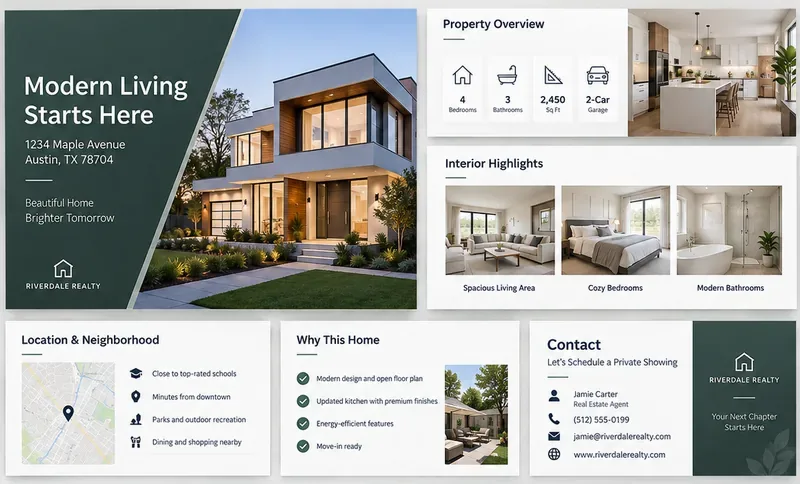
A modern listing-presentation layout can combine a strong property cover with reusable placeholders for facts, photos, location context, selling points, and contact information.
First misconception: a PowerPoint theme is not the same as a reusable listing template
Verified: Microsoft treats themes and templates as different things. A theme gives you coordinated visual styling. A template can include that theme plus slide layouts, placeholders, and guidance for future presentations.
What depends on your workflow: if you only need one seller deck, a normal .pptx presentation may be enough. If an agent, team, or brokerage will build many decks from the same structure, a .potx template is more appropriate.
Useful action: build the repeatable elements in Slide Master and slide layouts, then save the reusable version as .potx in desktop PowerPoint. Keep property-specific facts out of the master so old addresses, prices, or photos do not accidentally carry into the next listing.
A practical free slide blueprint
You can build a modern real estate listing presentation without buying a specialized design pack. The following slide structure is a free blueprint: use your own brand styling, licensed images, and verified property data.
Slide
Purpose
What to place in the template
1. Cover
Set context immediately
Property address placeholder, seller name or meeting title, hero image placeholder, agent or brokerage identity
2. Seller goals
Show that the presentation is about the client’s objectives
Timeline, priorities, move constraints, communication preference, decision factors
3. Property snapshot
Confirm the basic facts you are working from
Beds, baths, living area, lot size, major features, source/date note
Useful action: create only the layouts you will actually reuse. A 12-slide master does not require every seller meeting to contain 12 slides. Hide or delete irrelevant sections rather than filling them with generic text.
Second misconception: “free template” does not mean brokerage services are free
Verified for REALTORS®: the National Association of REALTORS® 2026 Code of Ethics states in Standard of Practice 12-1 that REALTORS® must not represent brokerage services as free or available at no cost unless they will receive no financial compensation from any source for those services. Article 12 also requires truthful real estate communications and a true picture in advertising and marketing. See the 2026 NAR Code of Ethics and Standards of Practice.
What depends on circumstances: compensation rules, required disclosures, agency language, and presentation wording can also depend on state law, brokerage policy, association rules, and the services being offered.
Useful action: if you publish or share the deck as a “free PowerPoint template,” make sure the word “free” clearly refers to the downloadable design or slide blueprint—not to brokerage representation or transaction services.
Third misconception: a CMA slide is not automatically an appraisal
Verified: NAR’s Responsible Valuation Policy describes comparative market analyses and broker price opinions as non-appraisal opinions and says they should make clear to the intended user that they are not appraisals. It also notes that a CMA is generally used to help sellers or buyers consider a listing price or offering price. See NAR’s Responsible Valuation Policy.
What depends on circumstances: the appropriate comparable properties, adjustments, market window, and data sources are local and time-sensitive. A generic template cannot determine them.
What the template cannot know: it cannot know whether the subject property has changed, whether a comparable had concessions, whether an MLS field was corrected, or whether a local market shifted after the deck was first created.
Useful action: label the section “Comparative Market Analysis” or another brokerage-approved term, add an “as of” date, identify data sources, and replace every comp table before each seller meeting. Do not leave example sale prices in the reusable master.
Fourth misconception: a photo already on the internet is not automatically free to reuse
Verified: the U.S. Copyright Office explains that original photographs are protected from the moment they are created and fixed, and the photographer is generally the initial copyright owner unless an exception such as a valid work-made-for-hire arrangement applies. Ownership of the property shown in a photograph does not by itself establish ownership of the photograph. See U.S. Copyright Office guidance for photographers.
What depends on circumstances: your rights may come from being the photographer, a written license, brokerage agreement, MLS license terms, stock-photo license, or another valid permission.
Useful action: put an image-rights check in the template workflow. Before presenting or distributing the deck, confirm that every property photo, map, floor plan, testimonial portrait, icon set, and stock image is yours to use for that purpose.
Fifth misconception: “modern neighborhood marketing” is not a license to describe who should live there
Verified: HUD’s Fair Housing guidance states that housing advertising must not indicate a preference, limitation, or discrimination based on characteristics protected by the Fair Housing Act. HUD also warns that words, photographs, illustrations, symbols, and targeting choices can create discriminatory implications. See HUD’s Fair Housing FAQ for housing providers and HUD guidance on housing advertising through digital platforms.
What depends on circumstances: local and state fair-housing protections can go beyond federal protected classes, so a national template cannot supply a universal list of acceptable neighborhood claims.
Useful action: design neighborhood slides around objective, verifiable property and location facts—distances, transit options, public amenities, documented property features, and properly sourced maps. Have brokerage compliance review recurring marketing language rather than hard-coding subjective descriptions into the template.
What “modern” should mean in the PowerPoint design
A modern deck does not need heavy animation or dozens of visual effects. For seller meetings, clarity usually matters more than novelty. A useful visual system can be built from a restrained type hierarchy, one accent color, generous margins, large photography placeholders, simple comparison tables, and consistent page numbers or section labels.
Microsoft’s Slide Master workflow is well suited to this because you can define recurring layouts once and reuse them throughout the deck. Microsoft’s support page also confirms that placeholders can be configured for text, pictures, charts, video, sound, and other objects. See Create and save a PowerPoint template.
Useful action: build five or six strong layout types instead of styling every slide manually: full-image cover, image-plus-facts, two-column text, comparison table, timeline/process, and closing/contact. Reuse them consistently.
Keep market claims current
Verified for REALTORS®: NAR Article 12 requires truthful communications, and Standard of Practice 12-8 says REALTORS® should use reasonable efforts to keep website information current and correct information that is no longer accurate. Standard of Practice 12-10 also addresses misleading images and content developed by others. Those provisions are a useful reminder that an attractive deck is not a substitute for current facts.
What depends on circumstances: market statistics can change weekly or monthly, and the most appropriate source varies by MLS, local association, brokerage, public record provider, or other authorized data source.
Useful action: add a small source/date field to every market-data layout. Make it visually obvious when the number was pulled and where it came from. If you cannot verify a statistic, remove it instead of leaving a polished but uncertain number on the slide.
Can you build the template in PowerPoint for the web?
Verified: Microsoft says PowerPoint for the web cannot create a PowerPoint template. To create and save a reusable .potx, use desktop PowerPoint. Once created, a normal presentation based on that template can still be shared through standard Microsoft 365 workflows, depending on your organization’s setup.
Useful action: if your team works mainly in the browser, maintain the master .potx from a desktop installation and distribute new working copies as presentations. Do not ask agents to overwrite the reusable master with property-specific data.
Pre-presentation fact-check checklist
Replace the sample address, photos, property facts, and agent information.
Confirm the seller’s goals and timeline rather than assuming them.
Update every comparable and market statistic and add an “as of” date.
Label a CMA appropriately and do not present it as an appraisal.
Verify image, map, floor-plan, testimonial, and logo usage rights.
Remove subjective or discriminatory neighborhood language.
Confirm that claims about marketing channels match what you actually provide.
Use brokerage-approved compensation and service language.
Check that testimonials and past-performance examples are accurate and permitted.
Read the presentation in Slide Show mode to catch clipped text, tiny tables, and low-resolution images.
Create a fresh client copy; keep the reusable template clean.
Bottom line
A free modern real estate listing presentation template is most valuable as a repeatable framework, not as a prewritten sales script. The PowerPoint mechanics are straightforward: use Slide Master, reusable layouts, placeholders, and a .potx file when you need a true template. The harder work is keeping every property fact, market statement, image, valuation discussion, and service claim accurate for the specific seller.
Build the design once, but verify the content every time. That combination gives you the speed people want from a template without turning yesterday’s data or someone else’s marketing material into today’s presentation.