A weekly cleaning schedule can make Airbnb hosting easier to manage, but it works best when it is used for the right job. Airbnb's current host ground rules require homes to be clean and free of health hazards before check-in, and they specifically expect hosts to clean between every stay. A weekly calendar does not replace that turnover responsibility. Instead, it helps organize the recurring tasks that surround each turnover: supply checks, linen rotation, appliance cleaning, damage checks, backups, and deeper maintenance that may not need to happen after every guest.
This article uses a clearly fictional example throughout. Illustrative scenario: Maya manages one one-bedroom rental called Riverstone Studio. Some weeks she has two turnovers; other weeks she has one long reservation. She wants a printable sheet that her cleaner can mark by hand, while keeping an editable master in Microsoft Word. The property name, schedule, tasks, and outcomes below are examples only; they are not a real host testimonial or a tested performance result.
As of September 2026, Airbnb's Ground rules for home hosts say listings should be clean and free of health hazards before check-in and that hosts should clean between every stay, including tasks such as laundry, taking out trash, vacuuming or sweeping, and wiping down surfaces. Airbnb's host resource guidance also recommends using the same turnover checklist before every check-in to reduce missed tasks. See Prepare your space.
Useful action: keep two layers in your system: a turnover checklist triggered by every checkout, plus a weekly schedule for recurring cleaning, restocking, inspections, and non-turnover work.
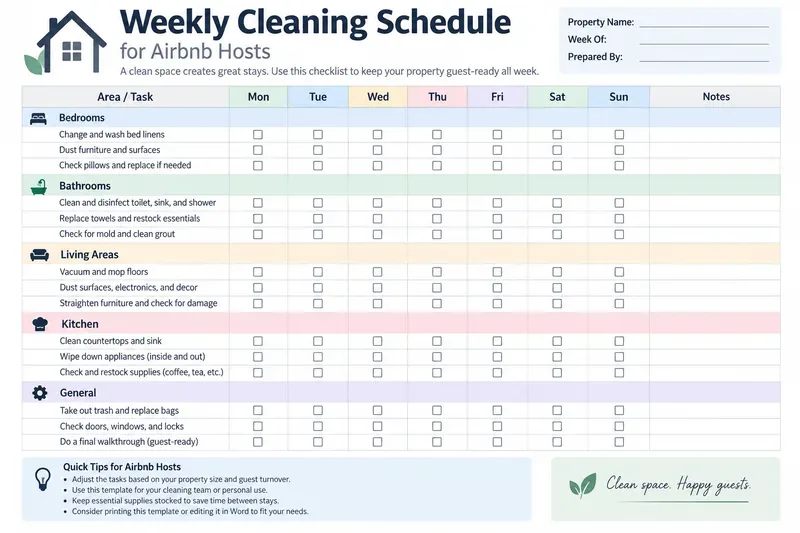
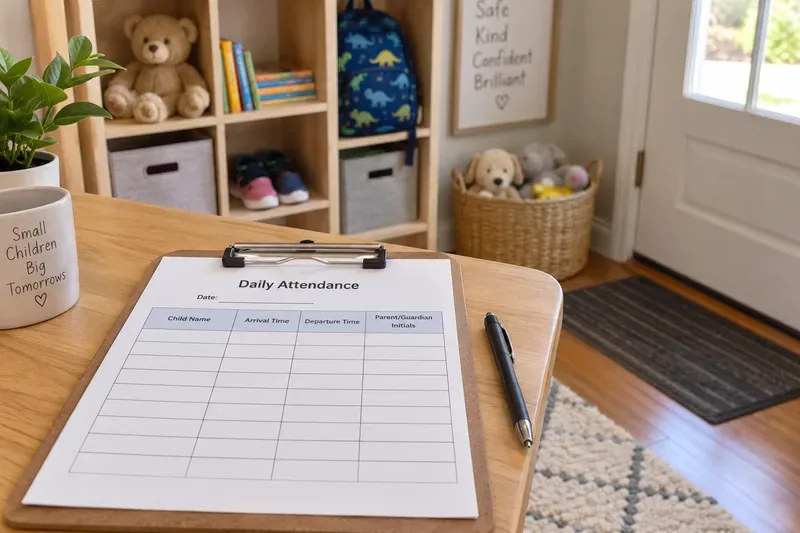
Example printable weekly schedule with room-based task groups, daily checkboxes, property details, and a notes column for exceptions or follow-up.
The key distinction: turnover cleaning and weekly cleaning are not the same thing
One common misunderstanding is to assign “bathroom cleaning on Tuesday” or “change linens on Friday” and assume the home is covered for the week. That can fail immediately if a guest checks out on Wednesday. The booking calendar, not the weekday, determines when a turnover clean is required.
For Maya's fictional Riverstone Studio, the master sheet therefore has two task types:
| Task type | Trigger | Example | How to record it |
|---|
| Turnover | After every stay, before the next check-in | Fresh linens, bathroom clean, trash removal, floors, kitchen reset | Mark on the day the turnover occurs |
| Recurring weekly | Once during the operating week unless turnover already covers it | Check under furniture, inspect supplies, wipe less-used storage areas | Assign a preferred day and move it when bookings change |
| Condition-based | When an issue is found | Stain treatment, minor repair, mold or pest follow-up | Write the issue in Notes and escalate separately |
| Periodic | Every few weeks or months, based on the property | Deep appliance clean, filter replacement, inventory count | Reference a separate maintenance cadence |
What is verified: Airbnb expects cleaning between stays. What depends on circumstances: how often you deep-clean the oven, rotate mattress protectors, descale fixtures, or inspect HVAC filters depends on the property, occupancy, local conditions, manufacturer instructions, and your operating standards. What a generic template cannot know: your building rules, local health requirements, cleaner contract, or property-specific risks.
Useful action: write “Every Turnover” next to tasks that cannot wait for a particular weekday, then use the Monday-Sunday grid only to record when that turnover actually happened.
Copy this printable weekly cleaning schedule into Word
The following layout works well on one or two pages in landscape orientation. It is intentionally simple so a cleaner can check boxes quickly and leave short notes.
| Area / Task | Frequency / Trigger | Mon | Tue | Wed | Thu | Fri | Sat | Sun | Notes |
|---|
| Bedrooms | | | | | | | | |
| Change bed linens | Every turnover | □ | □ | □ | □ | □ | □ | □ | |
| Dust furniture and visible surfaces | Turnover / as needed | □ | □ | □ | □ | □ | □ | □ | |
| Check under bed and furniture | Weekly | □ | □ | □ | □ | □ | □ | □ | |
| Bathrooms | | | | | | | | |
| Clean toilet, sink, shower, and tub | Every turnover | □ | □ | □ | □ | □ | □ | □ | |
| Replace towels and restock essentials | Every turnover | □ | □ | □ | □ | □ | □ | □ | |
| Inspect grout, drains, moisture, and visible damage | Weekly / condition-based | □ | □ | □ | □ | □ | □ | □ | |
| Kitchen | | | | | | | | |
| Clean counters, sink, and food-contact surfaces | Every turnover | □ | □ | □ | □ | □ | □ | □ | |
| Clean dishes and check cookware | Every turnover | □ | □ | □ | □ | □ | □ | □ | |
| Check refrigerator for leftover food | Every turnover | □ | □ | □ | □ | □ | □ | □ | |
| Inspect oven, microwave, and small appliances | Weekly / as needed | □ | □ | □ | □ | □ | □ | □ | |
| Living Areas | | | | | | | | |
| Vacuum or sweep and mop floors | Every turnover | □ | □ | □ | □ | □ | □ | □ | |
| Dust surfaces and electronics | Turnover / as needed | □ | □ | □ | □ | □ | □ | □ | |
| Check furniture and visible damage | Every turnover | □ | □ | □ | □ | □ | □ | □ | |
| General | | | | | | | | |
| Take out trash and replace liners | Every turnover | □ | □ | □ | □ | □ | □ | □ | |
| Restock guest supplies | Every turnover / threshold | □ | □ | □ | □ | □ | □ | □ | |
| Check doors, windows, and locks | Turnover / weekly | □ | □ | □ | □ | □ | □ | □ | |
| Final guest-ready walkthrough | Before every check-in | □ | □ | □ | □ | □ | □ | □ | |
For Riverstone Studio, Maya might mark Monday and Friday as turnover days in one particular week. She could schedule the under-furniture check for Wednesday, when the unit is vacant, and do the supply inventory on Sunday. The following week may be completely different. The schedule is meant to move with the reservation calendar.
Useful action: add a top section for Property Name, Week Of, Cleaner, Check-in Time, Check-out Time, and Backup Contact. That turns a generic checklist into an operational handoff.
Build the Word master for editing, not for daily printing
Microsoft currently supports saving a reusable Word document as a template. On Windows, a basic template can be saved as a Word Template, and on Mac Microsoft documents the .dotx format for a normal Word template. See Microsoft Support: Create a template.
For Maya's fictional setup, the Word master contains the permanent structure: room names, standard tasks, property-specific supply levels, emergency contacts, and blank weekly checkboxes. She does not type booking-specific notes into the master. Each week she creates a fresh working copy.
Common misunderstanding: a Word template and a normal Word document are not identical. A normal .docx is easy to overwrite accidentally; a template is intended to be reused as the starting point for new documents.
Useful action: if you will reuse the schedule for months, save a clean master as a Word template. If you only need a one-off checklist, a .docx is simpler and perfectly adequate.
Export a PDF when you want a stable printable handoff
PDF is useful when the cleaner only needs to view or print the schedule. Microsoft says Office desktop apps can save or convert files to PDF without a separate add-in, and PDF is appropriate when you want the file to look the same on most computers or be printed. Word for the web also provides an Export option for downloading a PDF. See Microsoft Support: Save or convert to PDF.
Common misunderstanding: “PDF means nobody can edit it.” Microsoft explicitly notes that many programs, including Word, can open and edit PDFs. PDF is useful for preserving layout and simplifying printing, but it is not by itself a tamper-proof security control.
Useful action: keep Word as the editable master and export a dated PDF such as Riverstone_Weekly_Cleaning_2026-09-14.pdf for the cleaner. Preserve completed sheets if they form part of your operating records.
How the hypothetical week works in practice
Suppose Riverstone Studio has these fictional bookings:
| Day | Booking situation | Cleaning priority |
|---|
| Monday | Guest checks out at 11:00 AM; next guest arrives at 4:00 PM | Full turnover checklist plus final walkthrough |
| Tuesday | Occupied | No entry unless previously arranged or required |
| Wednesday | Occupied | No routine interior cleaning during the stay |
| Thursday | Checkout the next morning | Confirm cleaner, linens, and restock inventory |
| Friday | Checkout and new check-in | Full turnover checklist |
| Saturday | Occupied | No routine interior cleaning |
| Sunday | Vacant after checkout | Turnover plus one weekly inspection task |
This example shows why a rigid Monday-to-Sunday cleaning plan can be misleading. The same printed form works because it records when work happened while the booking calendar determines when turnover work is required.
Useful action: review the reservation calendar before assigning weekly tasks. Move nonurgent work into vacant windows rather than entering an occupied property simply because the template says “Wednesday.”
What should be on the turnover checklist every time?
Airbnb's host guidance from January 2024 recommends focusing on high-traffic areas, refreshing every room, using fresh linens and towels, cleaning floors, and following the same turnover checklist before every check-in. Airbnb's separate cleanliness article also lists examples such as cleaning surfaces, remaking beds, cleaning bathrooms, refilling soap, putting away clean dishes and cookware, cleaning kitchen appliances, removing leftover food, and taking out trash. See Airbnb's cleaning checklist guidance.
That guidance is useful, but it is not a property-specific operating manual. A home with a hot tub, fireplace, crib, pet amenities, grill, pool, septic system, or specialty equipment needs additional procedures.
Useful action: add a “Property-Specific” section to the Word master rather than squeezing unique equipment into a generic room checklist.
Add a completion standard, not just a checkbox
A checked box can mean different things to different people. “Clean kitchen” is vague; “sink empty, counters wiped, dishes put away, refrigerator checked for leftovers, trash removed” is auditable.
For Riverstone Studio, Maya could use three status marks:
- ✓ Done: task completed to the property's defined standard.
- R Restock: task completed but supply quantity is below the reorder threshold.
- ! Follow-up: cleaning revealed damage, maintenance, pests, moisture, stains, missing inventory, or another issue that cannot be closed by routine cleaning.
Useful action: define these symbols at the bottom of the printed page. If a cleaner discovers a maintenance issue, use a separate maintenance workflow rather than marking a cleaning box and assuming the problem is resolved.
Use quantities for supplies instead of “looks low”
Restocking is one of the easiest areas to standardize. Instead of writing “check coffee” or “check soap,” define a minimum level for the specific property.
| Supply | Example par level | Restock trigger |
|---|
| Toilet paper | Property-specific | Below the number your hosting standard requires |
| Hand soap | Full dispenser or sealed replacement | Below your refill threshold |
| Dishwasher tablets | Based on expected stay length | Insufficient for the incoming reservation |
| Coffee / tea | Based on your listed amenity promise | Below the amount needed to deliver what the listing promises |
The table deliberately does not prescribe universal quantities. Airbnb listings differ, stay lengths differ, and hosts promise different amenities.
Useful action: base par levels on what your listing actually promises and on the incoming reservation, then write the quantities into the Word master.
Leave enough time for cleaning—and build a backup path
Airbnb's cleaning strategy guidance recommends scheduling enough time between bookings for a thorough job and having a second cleaner or backup plan if the primary cleaner cannot make it. It does not prescribe one universal number of hours for every listing.
In the fictional Riverstone Studio scenario, Maya might learn that the normal turnover window is adequate for a one-bedroom apartment but not for an unexpected stain, appliance problem, or unusually dirty checkout. The weekly schedule therefore contains a Ready for Check-in? field rather than assuming a cleaning start time guarantees readiness.
Useful action: add a final sign-off line with cleaner name, completion time, issue flag, and host/co-host confirmation when required. Do not publish a universal cleaning-time target unless you have measured your own property and process.
Printable Word and PDF workflow
- Keep the permanent property checklist in Word or a .dotx template.
- At the start of each operating week, create a new copy and enter the reservation-driven turnover dates.
- Assign flexible weekly tasks to available vacant windows.
- Export the week as PDF for printing or a stable read-only-style handoff.
- Have the cleaner mark completion, restock needs, and follow-up issues.
- Update the Word master only when the standard process changes—not every time one guest creates an exception.
Useful action: version the master when responsibilities change, for example Riverstone_Cleaning_Master_v3.dotx, and date each weekly PDF. That makes it easier to tell whether a cleaner used the current checklist.
Final checklist before you print
- Property name and week are correct.
- Every known checkout has a turnover block before the next check-in.
- Every-turnover tasks are clearly distinguished from weekly tasks.
- Cleaner or co-host ownership is visible.
- Property-specific equipment is included.
- Supply thresholds match what the listing promises.
- There is space for maintenance and damage follow-up.
- A final guest-ready walkthrough is assigned before check-in.
- The Word master remains editable and separate from the weekly copy.
- The PDF prints legibly on the paper size your team actually uses.
Bottom line
A printable weekly cleaning schedule is most useful when it does not pretend every week looks the same. In the fictional Riverstone Studio example, the reservation calendar controls turnover cleaning, while the weekly sheet coordinates recurring inspection, restocking, and deeper tasks around those stays. That structure matches the practical reality behind Airbnb's current cleanliness expectations: the property must be clean for the incoming guest, and cleaning between stays is not optional simply because a different weekday was assigned on a template.
Use Word as the editable source of truth, export a dated PDF when you need a stable printable handoff, and keep property-specific requirements separate from generic cleaning advice. The result is a schedule that is simple enough to mark with a pen but detailed enough to show what was done, what still needs attention, and who owns the next action.