Home
» Tips
»
Simple Task Delegation Matrix Template in Word for Small Team Managers
Simple Task Delegation Matrix Template in Word for Small Team Managers
The most useful task delegation matrix for a small team is usually simpler than a full project-management chart. Give every task one clear owner, state how much authority that person has, define the result you expect, set a due date, and agree on the next check-in. If those five things are visible in one Word table, most managers can reduce the two questions that cause the most friction: “Who owns this?” and “What am I allowed to decide without asking?”
This is not a universal management standard, and it is not automatically the same as a RACI chart. The U.S. Office of Personnel Management describes delegation as assigning tasks while granting appropriate authority, providing resources, and giving timely feedback. Its supervisory guidance also recommends considering skill, experience, developmental needs, interests, workload, and fairness when choosing what to delegate and to whom. That is a better foundation for a small-team delegation sheet than simply putting names next to tasks. See the OPM supervisory and managerial framework.
Copy-ready task delegation matrix template
For a team of roughly two to eight people with a manageable number of recurring or project tasks, start with this structure:
Task / Deliverable
Owner
Delegated Authority
Due Date
Check-In
Success Criteria
Status
Prepare weekly client update
Jordan
Draft and send within approved format
Friday 2 PM
Thursday noon
Accurate status, risks, next steps; sent on time
In progress
Choose photos for landing page
Maya
Decide within brand guide and licensed asset library
Sept. 18
Sept. 16
Five approved-size images with documented usage rights
Not started
Renew software subscription
Leo
Recommend; manager approves purchase
Sept. 22
Sept. 19
Options compared on cost, seats, renewal terms, and required features
Not started
Investigate recurring support issue
Avery
Investigate and propose fix; escalate production changes
Sept. 15
Sept. 14
Root cause documented with evidence and next action
In progress
The names and dates above are examples. The important part is the column logic.
Why these columns matter
Task / Deliverable: describe the result, not just the activity
“Work on newsletter” is difficult to delegate because the finish line is unclear. “Draft September customer newsletter and route it for final approval” is easier to manage because the output can be checked.
Use this approach when: the assignment has a visible result that another person can recognize as complete.
Change the wording when: the task is really an ongoing responsibility, such as monitoring an inbox. In that case, define the service expectation: “Monitor support inbox weekdays; acknowledge priority messages within two business hours.”
Owner: one person should know they are driving the task
A task may involve several people, but the delegation matrix should identify the person who is expected to move it forward. Writing “Marketing team” as the owner often recreates the ambiguity the matrix is supposed to solve.
OPM’s delegation guidance emphasizes assigning responsibilities in a way that supports team and individual effectiveness and matching delegation to factors such as skill, experience, development, and workload. That means “the fastest person” should not automatically receive every important task.
Use this approach when: one team member can coordinate the work even if others contribute.
Reconsider the assignment when: the owner lacks the information, access, authority, time, or support needed to succeed. Delegating responsibility without the practical ability to act is not clear delegation.
Delegated Authority: say what the person may decide
This is the column that makes a delegation matrix different from a basic task list. “Authority” means the decisions the assignee is permitted to make while completing the task.
You do not need an elaborate formal scale. Plain-English labels are easier for a small team. Examples include:
Decide within scope: the owner can make normal task decisions without approval, as long as stated limits are respected.
Execute approved plan: the approach has already been decided; the owner carries it out and handles routine details.
Recommend; manager decides: the owner investigates and makes a recommendation, but the manager retains the final decision.
Escalate exceptions: the owner acts normally until a defined threshold is crossed, such as cost above $500, a missed deadline, a legal concern, or customer-impacting change.
These labels are practical examples, not an official delegation framework. Customize them to your organization.
Use this approach when: team members frequently stop work to ask whether they can make a decision.
Add a specific boundary when: the decision involves money, commitments to customers, policy exceptions, security, legal terms, staffing, or another area where authority should not be implied.
Due Date and Check-In: separate the finish line from the feedback point
A due date tells the owner when the result is expected. A check-in is an earlier moment to review progress, unblock the work, or correct assumptions.
This distinction matters because good delegation is not the same as disappearing until the deadline. OPM explicitly includes support and timely, objective feedback in its description of effective delegation.
Use one check-in when: the task is short, familiar, and low risk.
Use milestones instead when: the work is long, unfamiliar, expensive, dependent on external parties, or difficult to reverse.
Success Criteria: define what “good enough” means
A deadline without quality criteria encourages different interpretations. For a report, success criteria may include required sections and data sources. For a design, they may include dimensions, brand constraints, and approval requirements. For an operational task, they may specify response time or error tolerance.
Keep the criteria observable. “Make it professional” is hard to verify. “Uses the approved template, contains current figures, has no unresolved comments, and is delivered as PDF” is clearer.
Use this approach when: quality can be checked without relying only on the manager’s unstated preference.
Have a conversation rather than adding more text when: the task requires judgment that is hard to reduce to a checklist. The matrix should support management, not attempt to replace it.
When should you use RACI instead?
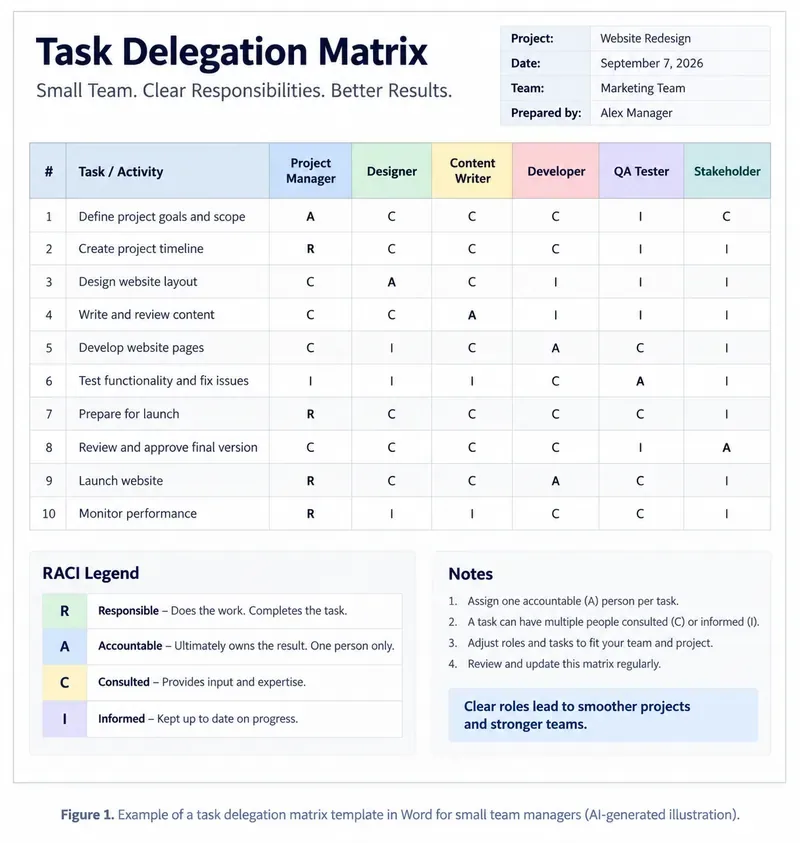
A RACI matrix is a different tool. PMI’s current project-management lexicon defines RACI as a type of responsibility assignment matrix using four statuses: Responsible, Accountable, Consulted, and Informed. In project work, that can be useful when many roles touch the same deliverable and people need clarity about who performs the work, who owns the outcome, who gives input, and who only needs updates. See the PMI Lexicon of Project Management Terms.
For a five-person team assigning everyday tasks, RACI can be more structure than you need. A simple owner-and-authority matrix is usually faster to read. For a website launch involving a manager, designer, developer, QA person, legal reviewer, client, and executive sponsor, RACI may be more useful because the question is no longer merely “Who did I delegate this to?” but “How do all these roles participate?”
AI-generated illustration of an optional RACI-style delegation matrix. The project, names, dates, tasks, and assignments are fictional examples; RACI is useful for cross-role responsibility mapping but is not required for a simple small-team delegation sheet.
How to build the matrix in Microsoft Word
Word is a reasonable choice when you want a printable, meeting-friendly document rather than a live task database. Microsoft’s current Word instructions support creating a table through Insert → Table; for a larger layout, you can choose the required number of rows and columns. See Microsoft’s Insert a table guide.
For the simple template in this article, create seven columns:
Task / Deliverable
Owner
Delegated Authority
Due Date
Check-In
Success Criteria
Status
Give more width to Task / Deliverable, Delegated Authority, and Success Criteria. Microsoft documents Word’s AutoFit controls for fitting columns to their contents or to the available page width. See the official table resizing guide.
If the table becomes long enough to cross pages, select the first row and use Table Layout → Repeat Header Rows. Microsoft notes that repeated headers appear in Print Layout and when printed, and that they work across automatic page breaks. See Repeat table header on subsequent pages.
Turn it into a reusable Word template
If you plan to use the matrix repeatedly, keep the headings, instructions, and formatting but remove project-specific names and dates. Then save it as a Word template rather than repeatedly overwriting the same document.
Microsoft’s current template instructions say Word can save a reusable template as .dotx; a macro-enabled template uses .dotm. On Word for Mac, Microsoft documents File → Save as Template and Microsoft Word template (.dotx). See Microsoft’s Create a template documentation.
A useful template header can contain:
Field
Purpose
Team / Project
Shows the context for the assignments
Manager
Identifies who is coordinating the delegation
Review Date
Tells the team when the matrix was last confirmed
Authority Notes
Defines any spending, customer, security, or policy boundaries that apply across tasks
A small-team example: what good delegation looks like
Imagine a four-person marketing team preparing a customer webinar. The manager delegates the landing page to Taylor.
A weak entry is:
Task: Landing page
Owner: Taylor
Due: Friday
A stronger entry is:
Task: Publish webinar registration landing page
Owner: Taylor
Authority: Decide layout within existing brand system; manager approves pricing language
Due: Friday 3 PM
Check-In: Thursday 11 AM
Success Criteria: Page works on mobile, form submits correctly, event date/time match invitation, approved legal footer included
Status: In progress
The second version does not micromanage how Taylor builds the page. It clarifies the boundaries that matter and leaves room for professional judgment.
When Word is the right tool—and when it stops being enough
A Word delegation matrix works well when the team is small, the number of active assignments is modest, tasks are reviewed in a regular meeting, and the document is mainly a shared reference or printable handout.
Keep Word if people can open one current document and answer:
Who owns each important task?
What can that person decide?
When is the result due?
When will progress be checked?
What outcome counts as complete?
Consider a spreadsheet or task-management system when the matrix changes several times a day, many people update it simultaneously, tasks need automated reminders, dependencies matter, you need comment history or audit history, or managers spend more time reformatting the Word table than discussing the work.
The point is not that a software tool is “more professional.” The better tool is the one that keeps the ownership and decision boundaries current without creating unnecessary administration.
Common mistakes to avoid
Assigning responsibility without authority
If someone owns a vendor comparison but cannot contact vendors, access pricing, or recommend a choice, the delegation is incomplete. Add the access and decision boundary needed to complete the work.
Delegating only low-value work
OPM includes developmental needs and interests among the objective criteria managers can consider when delegating. Delegation can therefore be a development tool, not only a way to unload routine tasks. Match stretch assignments with appropriate support and check-ins.
Using “everyone” as the owner
Collaboration is valuable, but shared participation should not make ownership invisible. Put one person in the Owner column and list contributors in the task description or notes if needed.
Writing a deadline but no result
“Due Friday” does not define what must exist by Friday. Pair the date with success criteria.
Turning every task into a RACI exercise
RACI is useful when multiple stakeholders play different roles around the same work. For routine delegation inside a small team, the simpler matrix is usually easier to maintain.
Never reviewing the matrix
A stale assignment chart is worse than no chart because it looks authoritative. Put a review date in the document and update ownership when priorities, workload, or staffing change.
Final check before you use the template
Read each row as if you were the assignee. You should be able to answer four questions without asking the manager for hidden context: What result am I responsible for? What decisions may I make? When is it due? What will tell us that it is done well?
If any row fails that test, revise the assignment before adding more formatting. A simple task delegation matrix earns its value by reducing ambiguity, not by looking sophisticated. Word is enough when the team needs a stable, printable reference; RACI is useful when role interactions become more complex; and a live task system becomes the better choice when the matrix changes faster than a document can realistically stay current.